Case study
Simplifying contracts creation
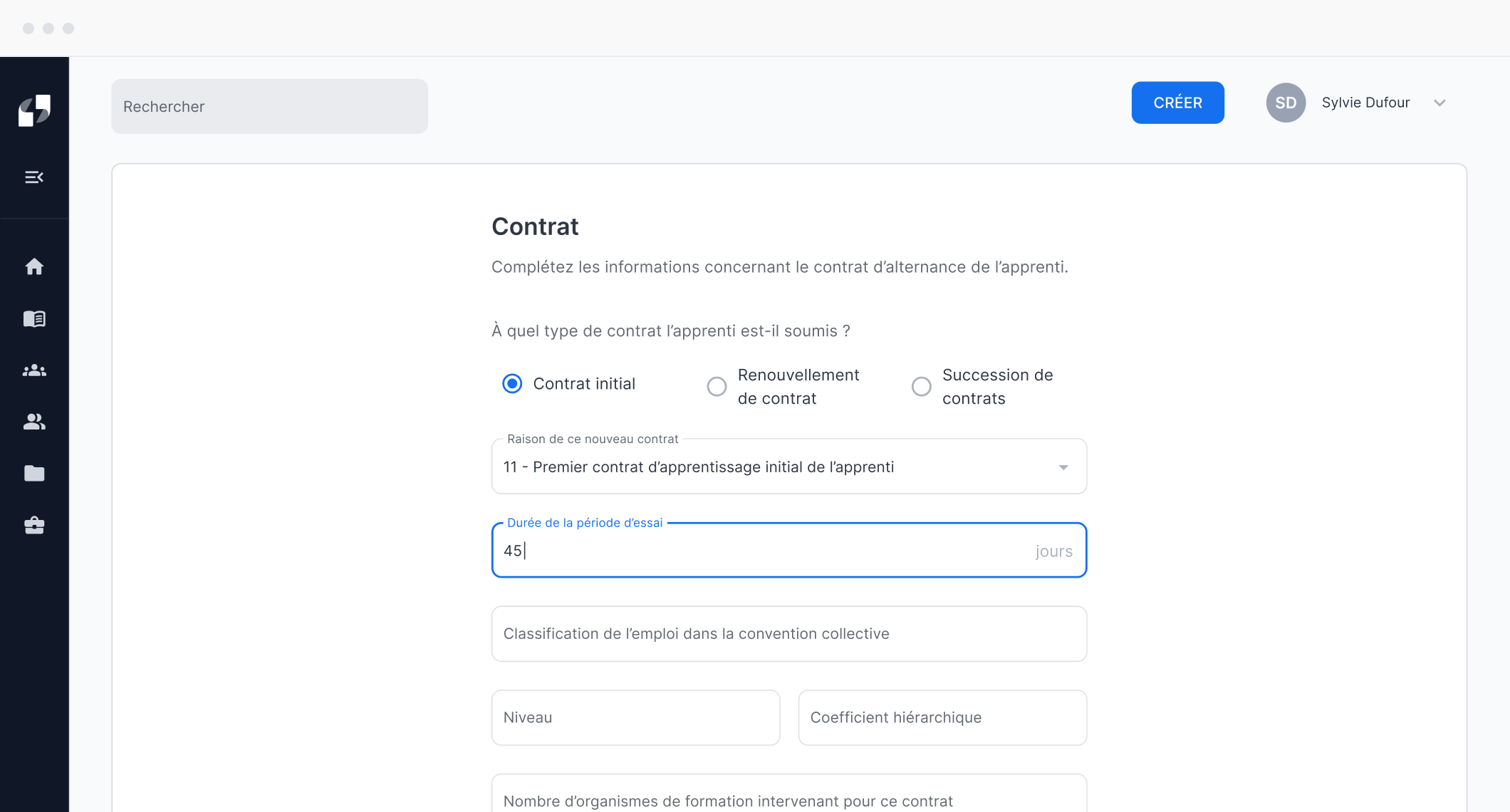
Designed from 0 → 1 Filiz SaaS to streamline contract creation workflows.
Role & Tasks
UX/UI Designer: Qualitative User Research, UX Design, UI Design & Design System
Timeline & Status
8 months (2022)
Shipped
Team
2 Co-founders, 1 SWE, 1 Designer
Project summary
Filiz is a SaaS platform designed to streamline contract creation and simplify administrative workflows for apprenticeship training centers.I joined the startup early on as an apprentice to design the first MVP, from core product experience to the design system, in collaboration with the co-founders.Launched in fall 2022, the product was quickly adopted by 10+ schools within a year, generating $100K+ in revenue.

CONTEXT
The growth of apprenticeships on the job market.
High growth potential for apprenticeship hitting new records.
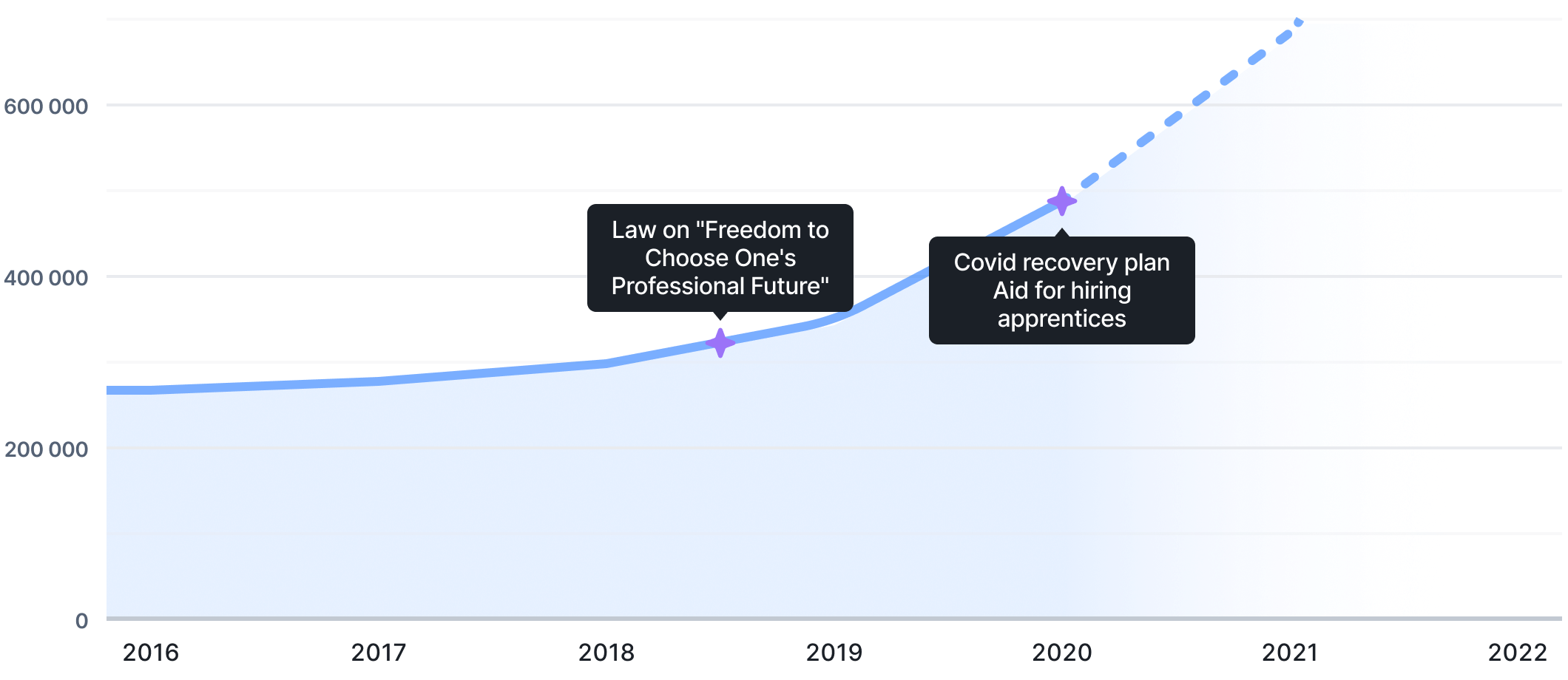
Chart: Growth in the number of apprenticeship contracts in the private sector
Sources: Vie publique & Communiqué de presse du Ministère du travail de la santé et des solidarités
First observations about apprenticeship contracts

Apprenticeship contracts involve three different stakeholders, making the process particularly complex.`

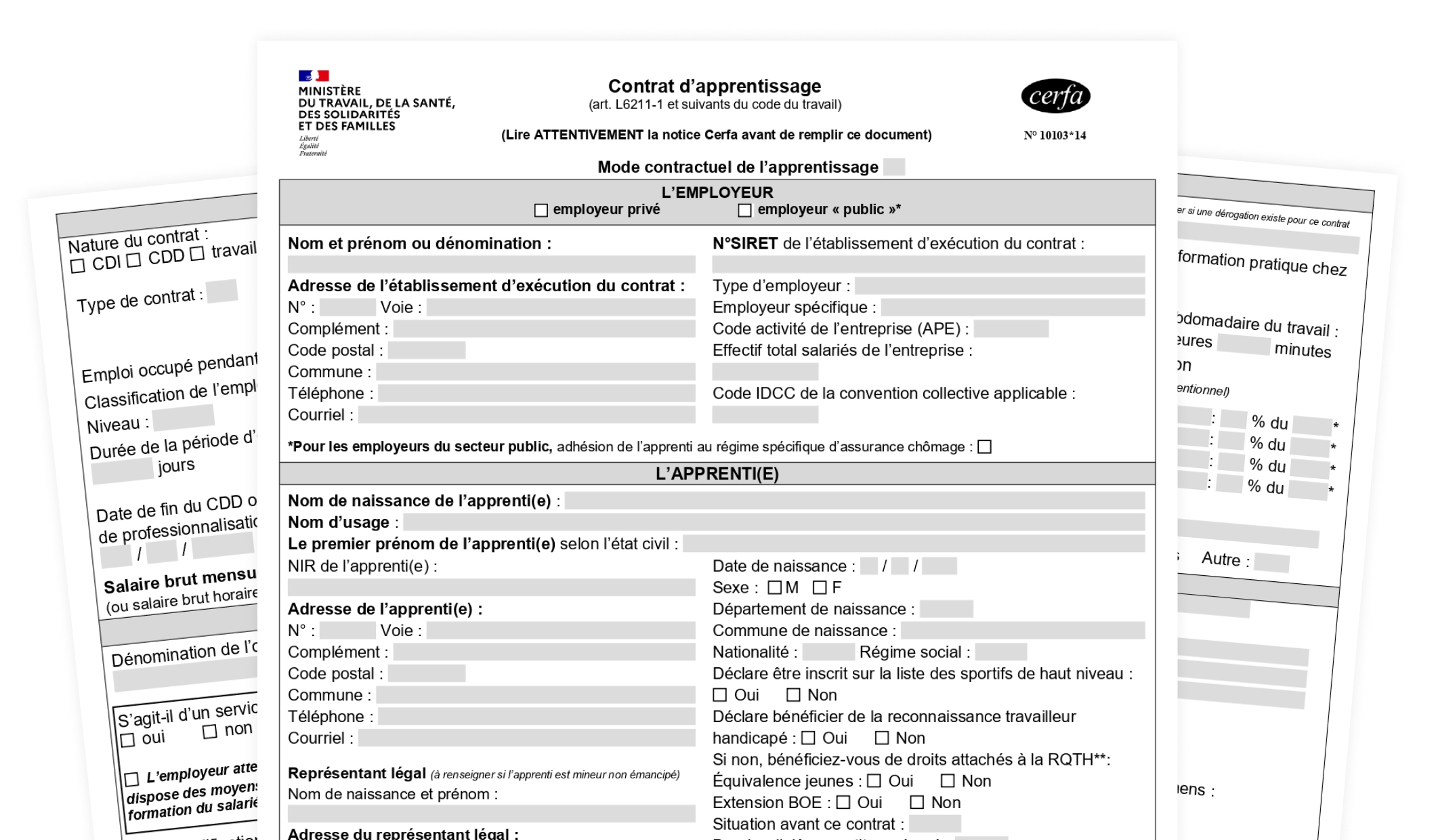
The contract process is outdated and relies on a paper-based public-sector form.

Limited visibility and dependency on OPCO approval create uncertainty around training funding.
This is how does the paper form looks like
As a result, schools are experimenting

Low engagement from stakeholders in the process

Negative ROI due to time consuming tasks
Problem statement

DESIGN PROCESS
Design with speed & quick iteration.
Our goal was to build a MVP to quickly find PMF. The design process consisted in short and quick iteration loops in a broader lean approach adopted from co-founders.

User Research
Understanding current process and workflow.

Define
Defining features and product requirements through user stories.

Design
Designing and prototyping features.

DISCOVERY
Get to know the apprenticeship ecosystem.
Highly flexible and uncertain process
From a workflow flow, we learned that apprenticeship process remains highly flexible and differs from one school to another.

Step 1
Step 2
Step 3
Step 4
Step 5
Key insights from our user interview

Corporate relations officers experience high mental load due to the complexity, volume, and coordination of contract-related tasks.

Many contract-related tasks are repetitive and time-consuming, increasing operational overhead.

Limited visibility into contract status creates uncertainty due to fragmented roles and responsibilities.
Primary product-user archetpyes
Insights from the interview helped us define our first product archetypes, used as a reference to align design decisions throughout the project.
Primary

Sylvie D.
38, Corporate Relations Officer
With nearly six years of experience, Sylvie has developed strong expertise across the full range of administrative processes.
Motivations
- Free up time for high-value tasks where her expertise truly benefits the school
- Increase efficiency when handling repetitive administrative work
Pain points
- Having to follow up with students or companies to track contract progress
- Identifying errors in contracts late in the process
Secondary

Gilles L.
42, CEO of a thermal insulation company
After completing his studies, Gilles founded a thermal insulation company for buildings. Today, his company operates nationwide.
Motivations
- Save time when filling out apprenticeship contracts
- Access financial incentives for hiring apprentices
Pain points
- Tracking payments he is expected to receive
- Having to register to multiples tools to manage apprenticeship contracts

USER EXPERIENCE
Rationalizing a complex process.
Redesigning the contract process
Starting from an unstructured process that varies across schools, first step was to rationalize the contract creation workflow.
From inventory to user flows
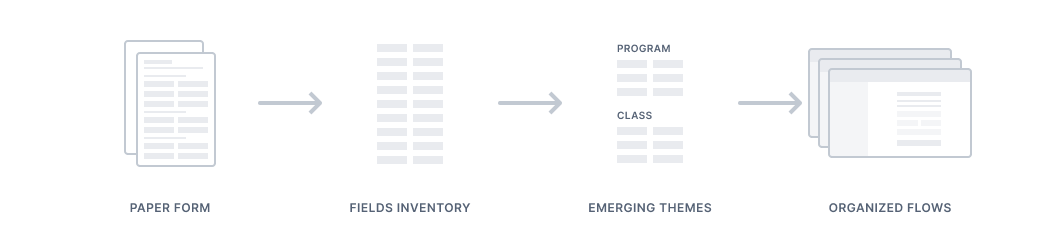
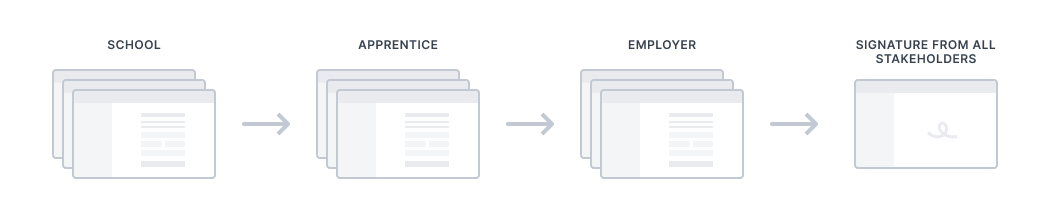
From the original paper form, we conducted an inventory of required fields to reorganize the information and then create user flows.
Sharing responsibilities across stakeholders
These flows rely on a shared set of core features, ensuring consistency across the product.
They also redistribute responsibilities by involving both the company and the student, reducing the operational burden placed on schools.
School as the orchestrator
The school remains an oversight role within the process, supported by tools that provide fine-grained monitoring and control of contracts at scale.

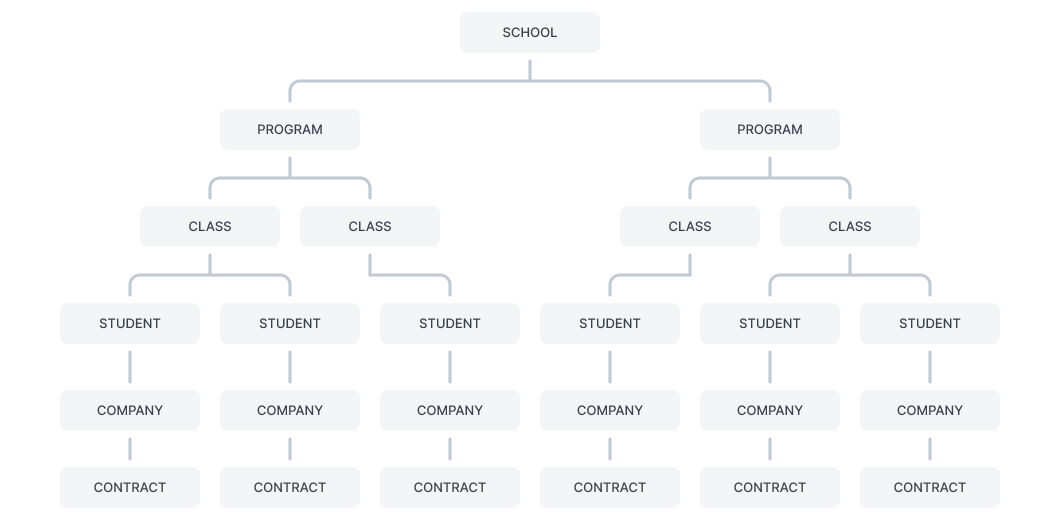
The backbone of the process
The app is structured around six core features that form the functional foundation of the process.
A step-by-step process
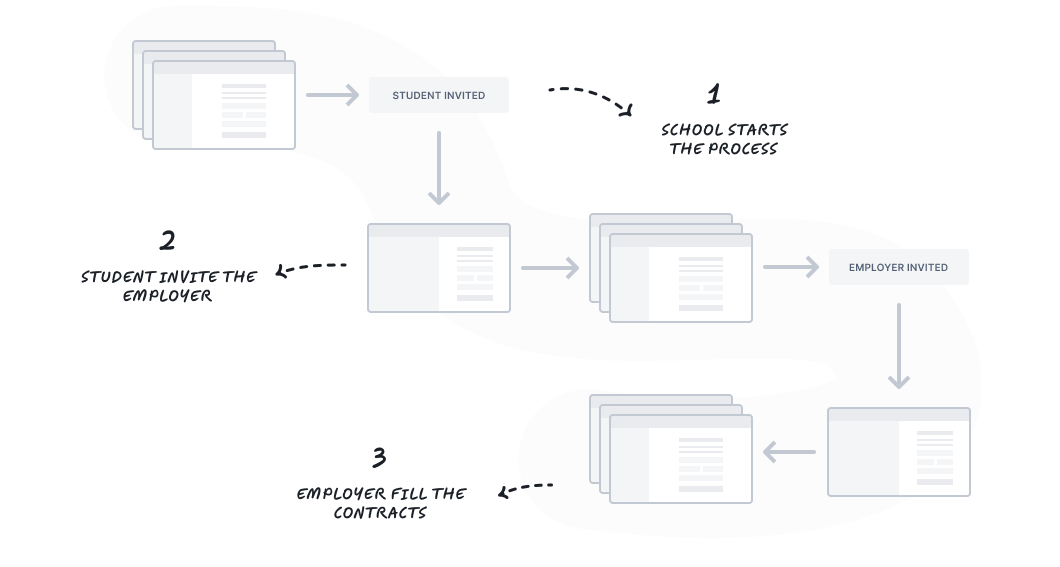
The process is broken down into successive, asynchronous steps using staged disclosure allowing to segment tasks and distributing cognitive effort over time.

DESIGN & LAYOUT
Laying down foundations for the app.
Leveraging familiar SaaS patterns
By relying on familiar patterns, the interface leverages existing mental models, reducing onboarding effort and helping users navigate the product with confidence.
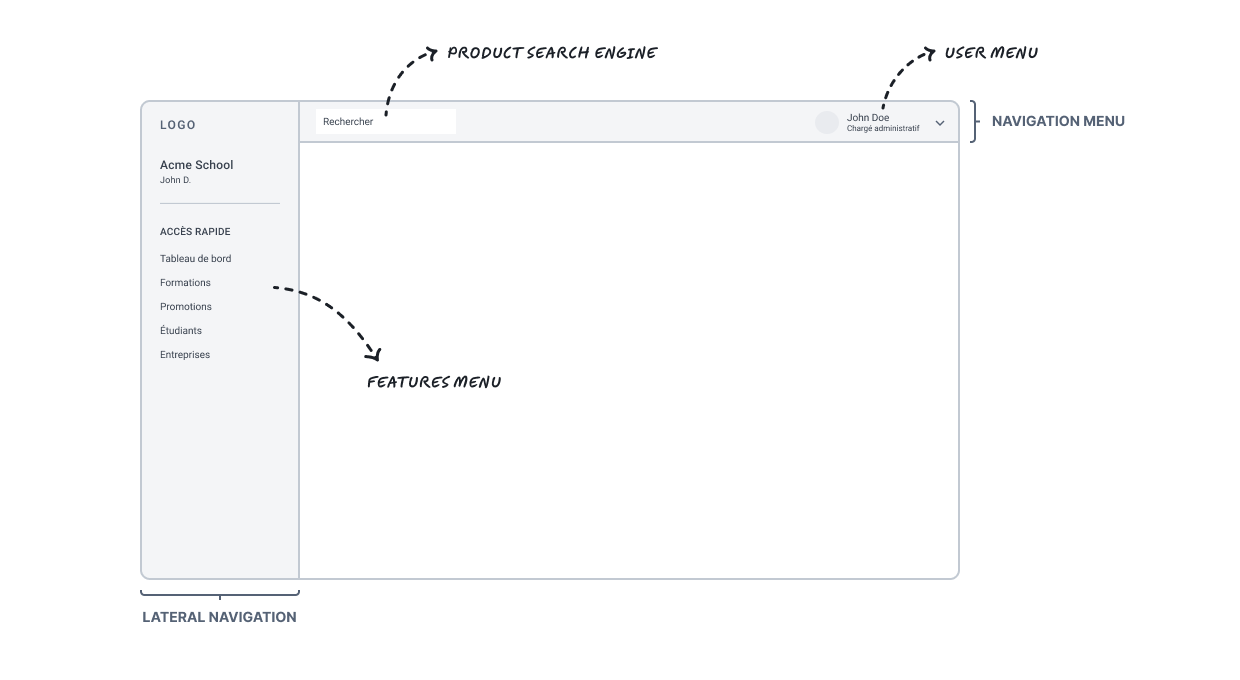
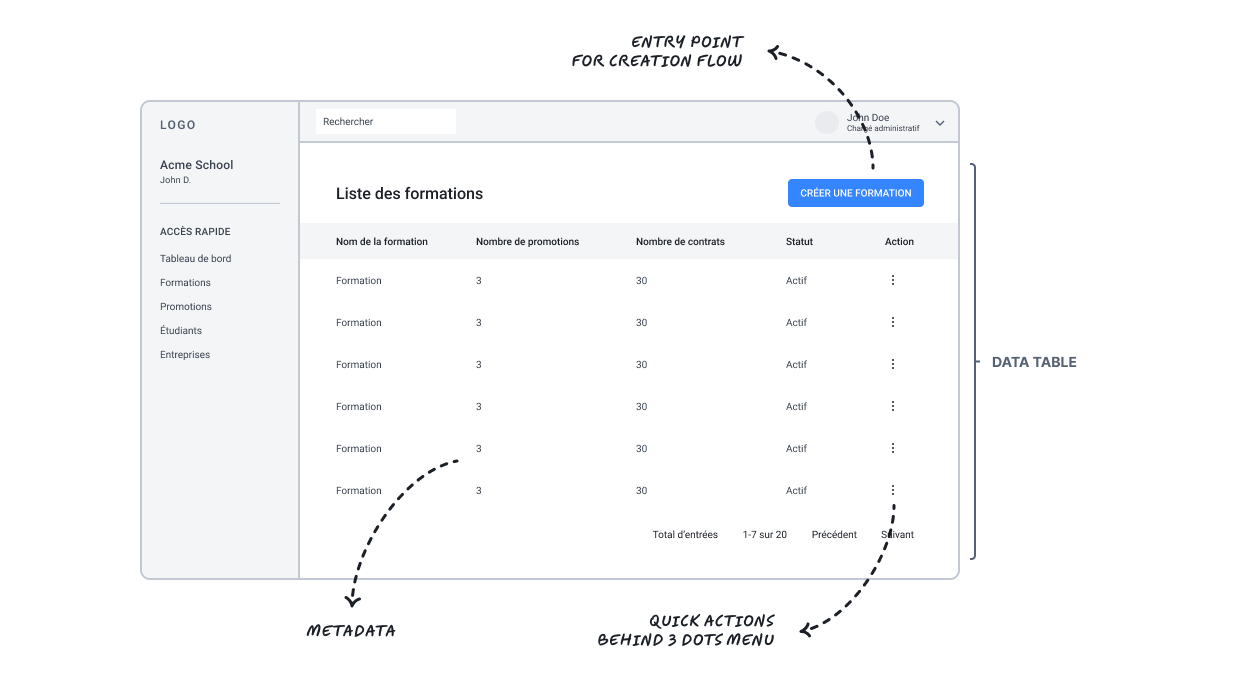
Data tables to provide overview and control
Data tables were chosen to display contract entries and key metadata. They give schools a clear overview of their operations and enable efficient monitoring and control at scale.
Forms – finding balance between usability and technical constraints
As forms sit at the core of the product experience, multiple layouts were explored to balance usability and development constraints.
A grid-based layout was selected for its flexibility, functional clarity, and low implementation cost.
Isolated
Visual Focused
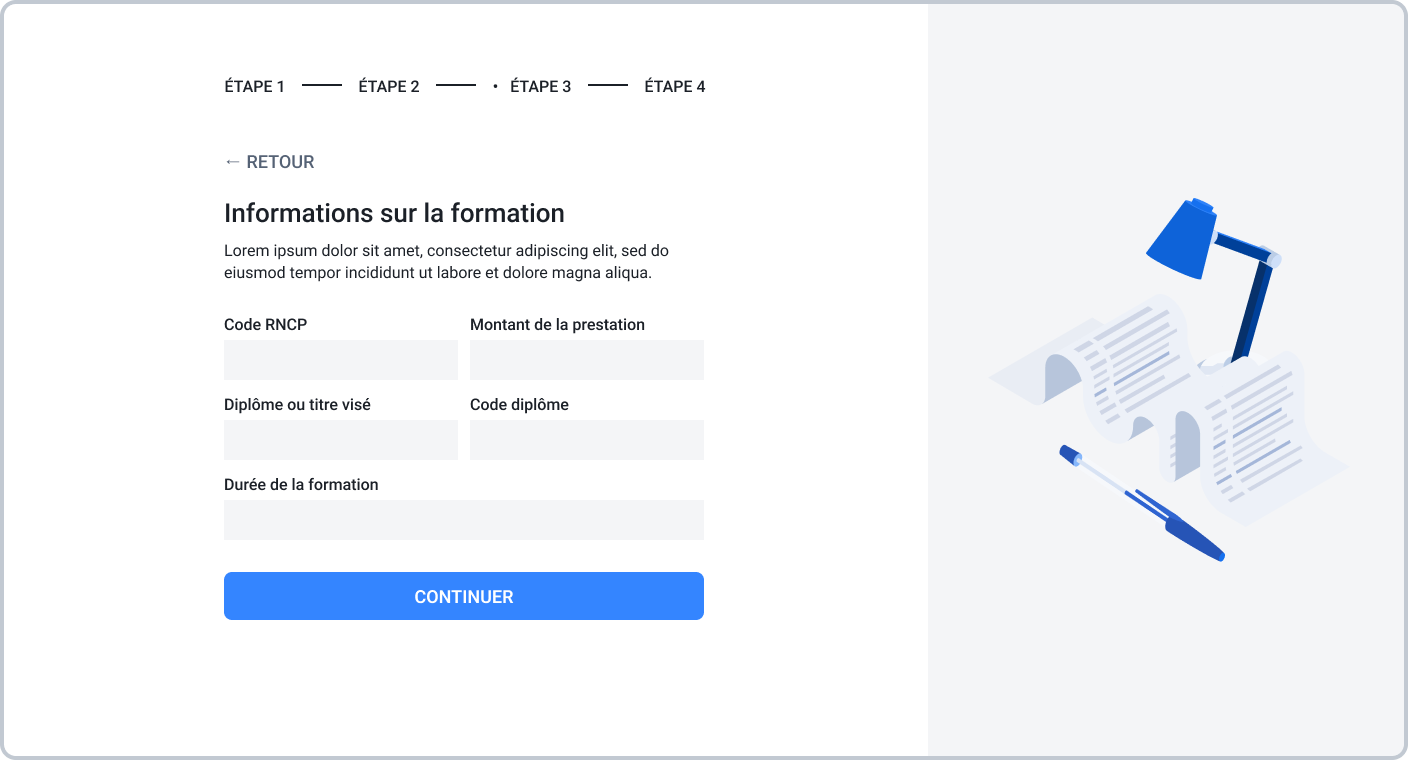

Visual appeal through illustration, strengthening brand identity.

Left-aligned layout can affect comfort.
Integrated
Functional Focused
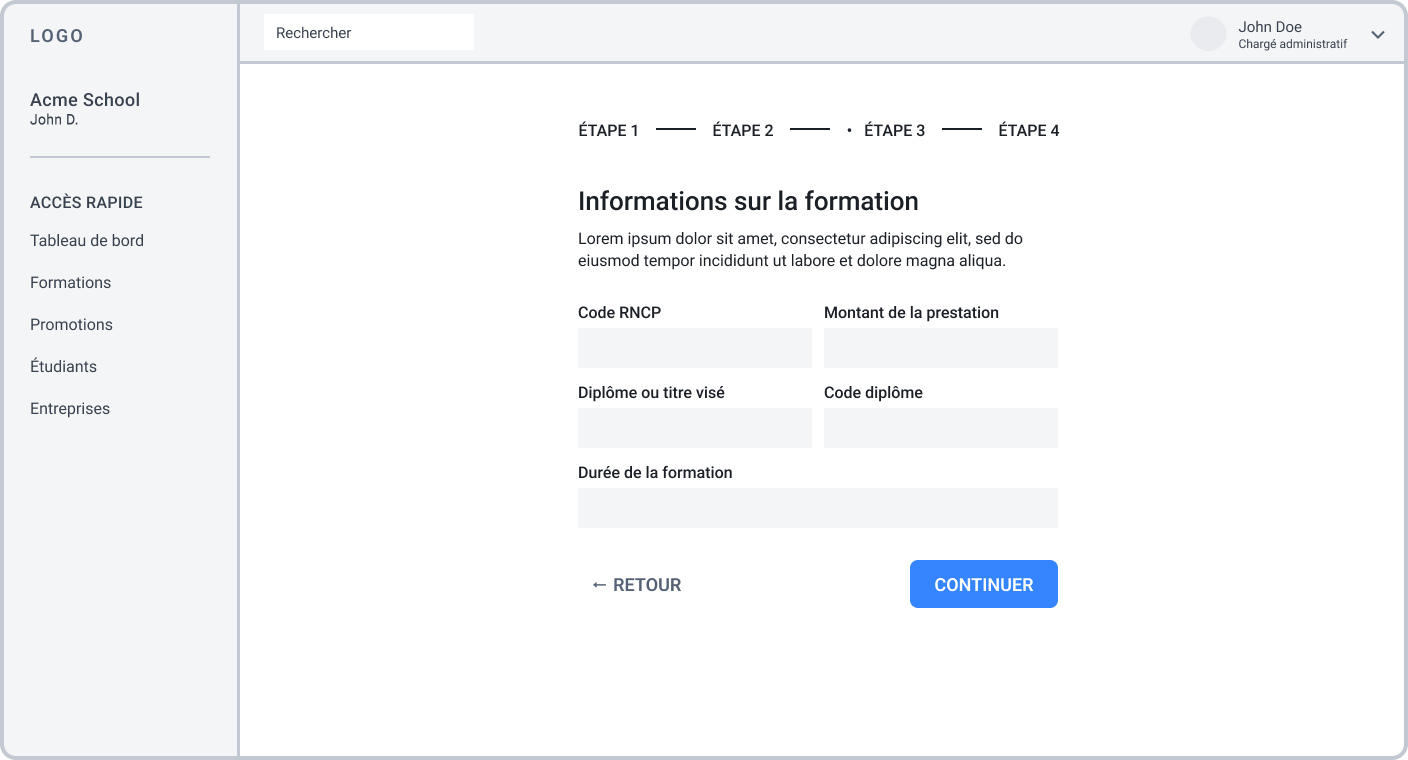

Grid-based layout supports flexible composition.

Full-width content improves focus.
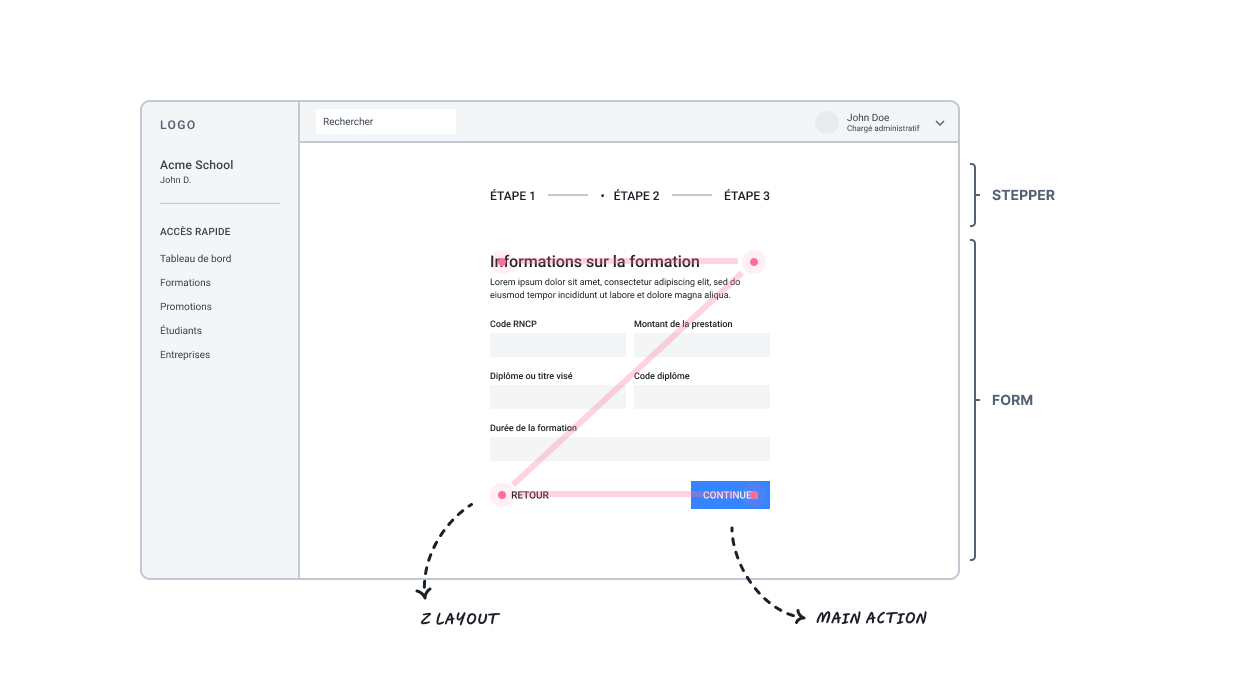
Making forms suitable for legibility and scannability
Forms include a stepper for status and progress with fields grouped by theme. The layout improves readability and scannability from completion to review.
DESIGN & LAYOUT
Building the application’s layer.
Set-up a scalable design system
To reduce design effort and UI debt, we relied on a component-based design system that allows us to save hundreds of hours of UI design.
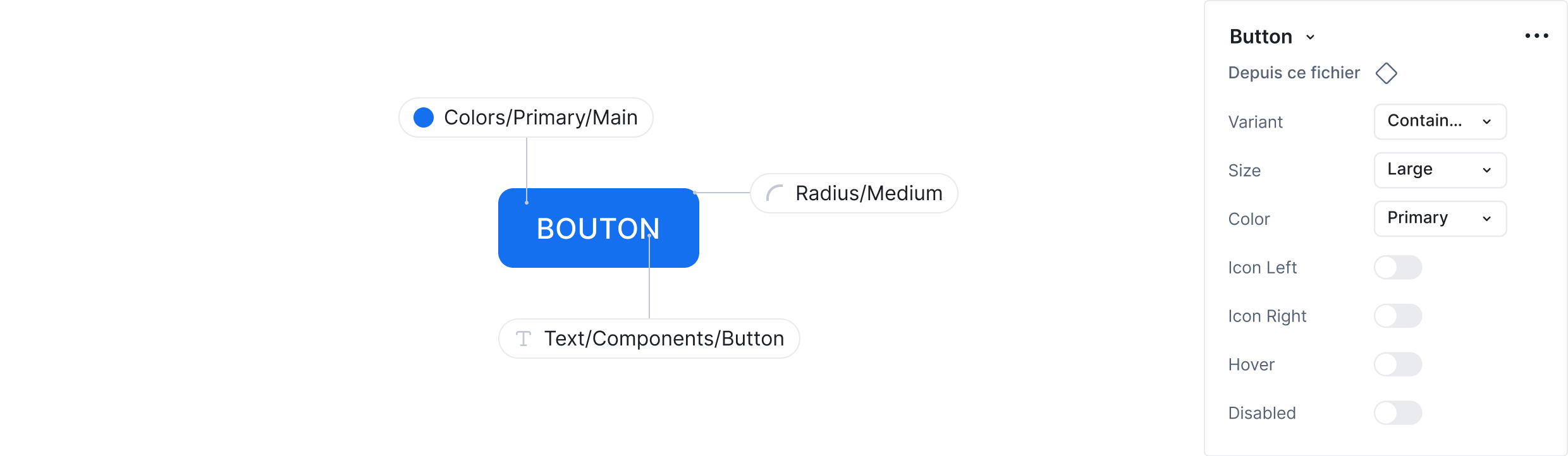
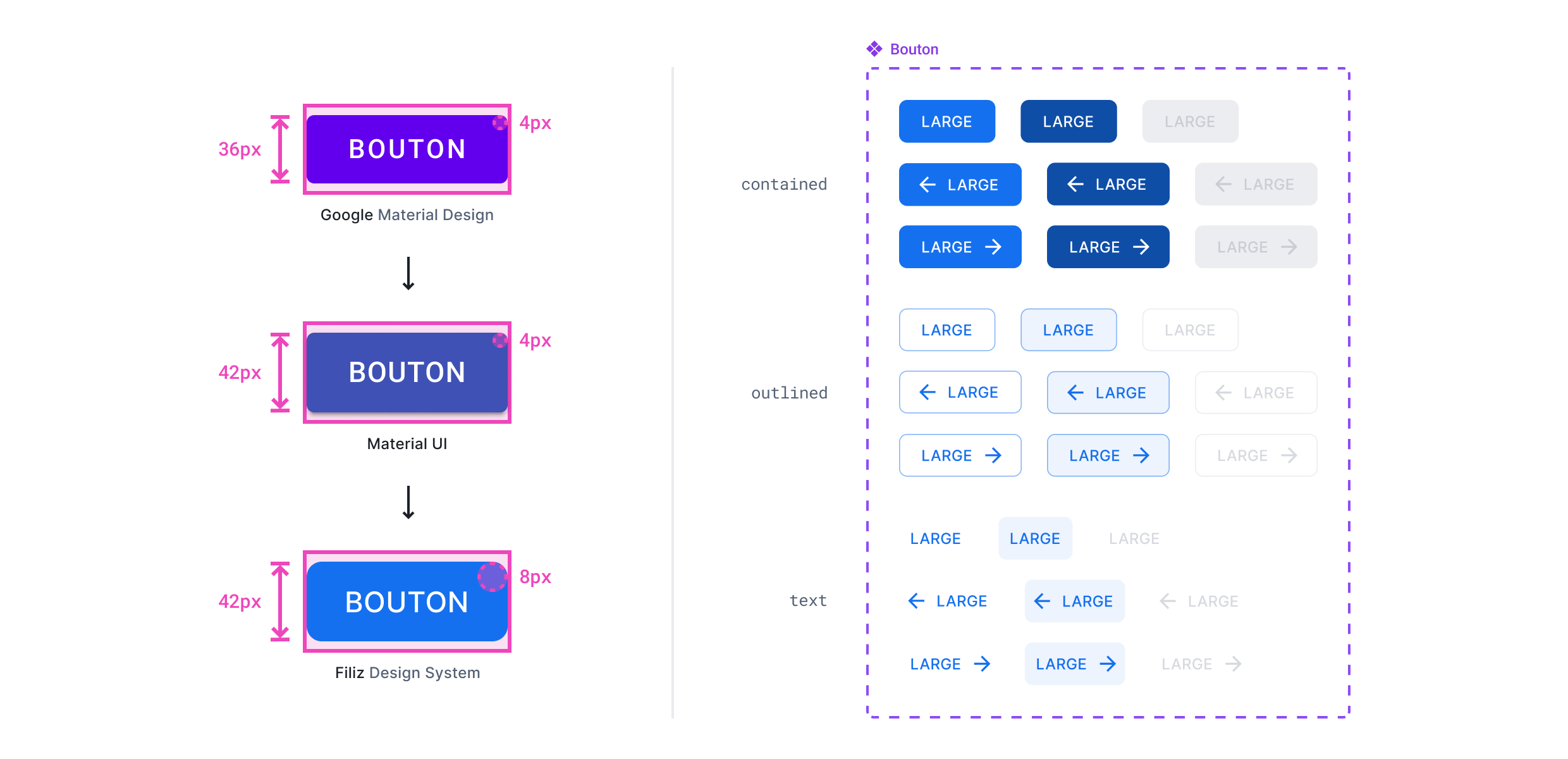
With Material UI, we defined design tokens following brand guidelines for components bulk update while ensuring consistency and long-term scalability.
Leveraging Material Design look & feel
By leveraging MUI, the interface benefits from familiar Material Design patterns, improving usability and learnability.
Accessibility best practices are embedded by default, ensuring readable contrast and accessible interactions.

Precise and consistent interface
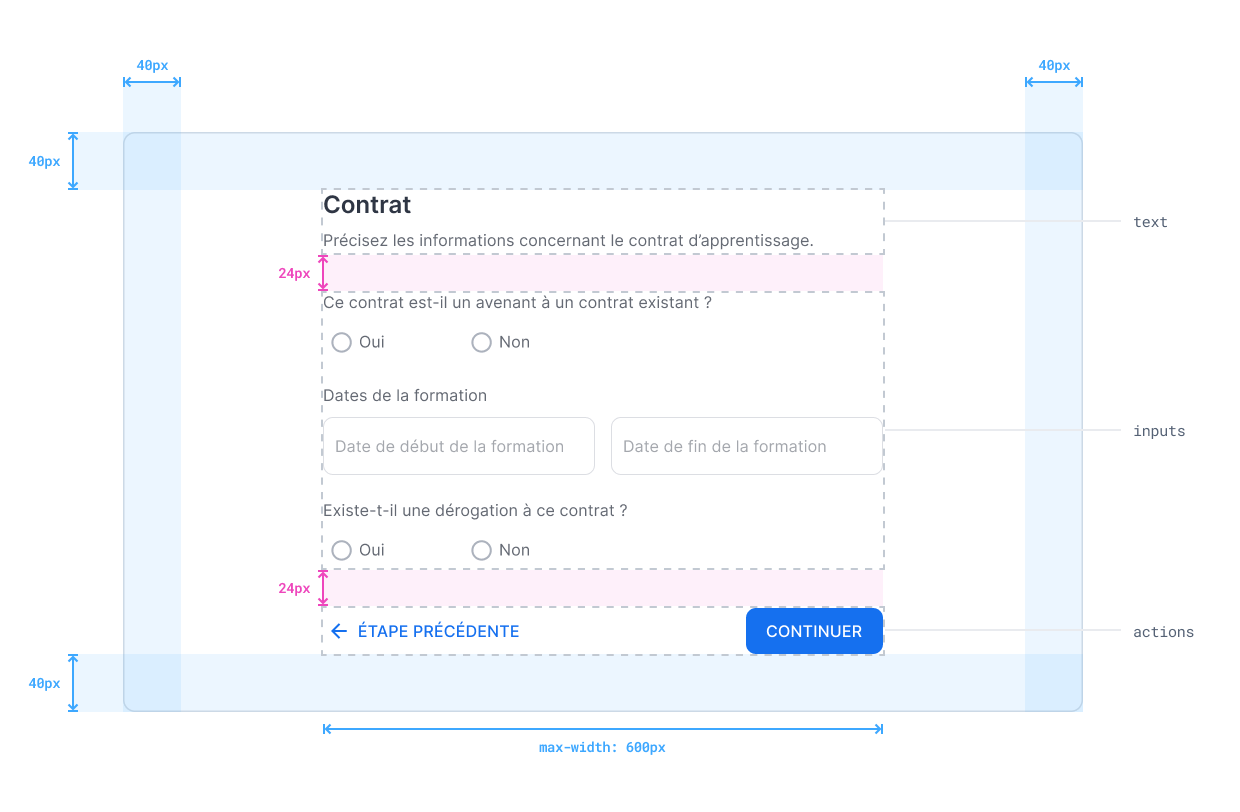
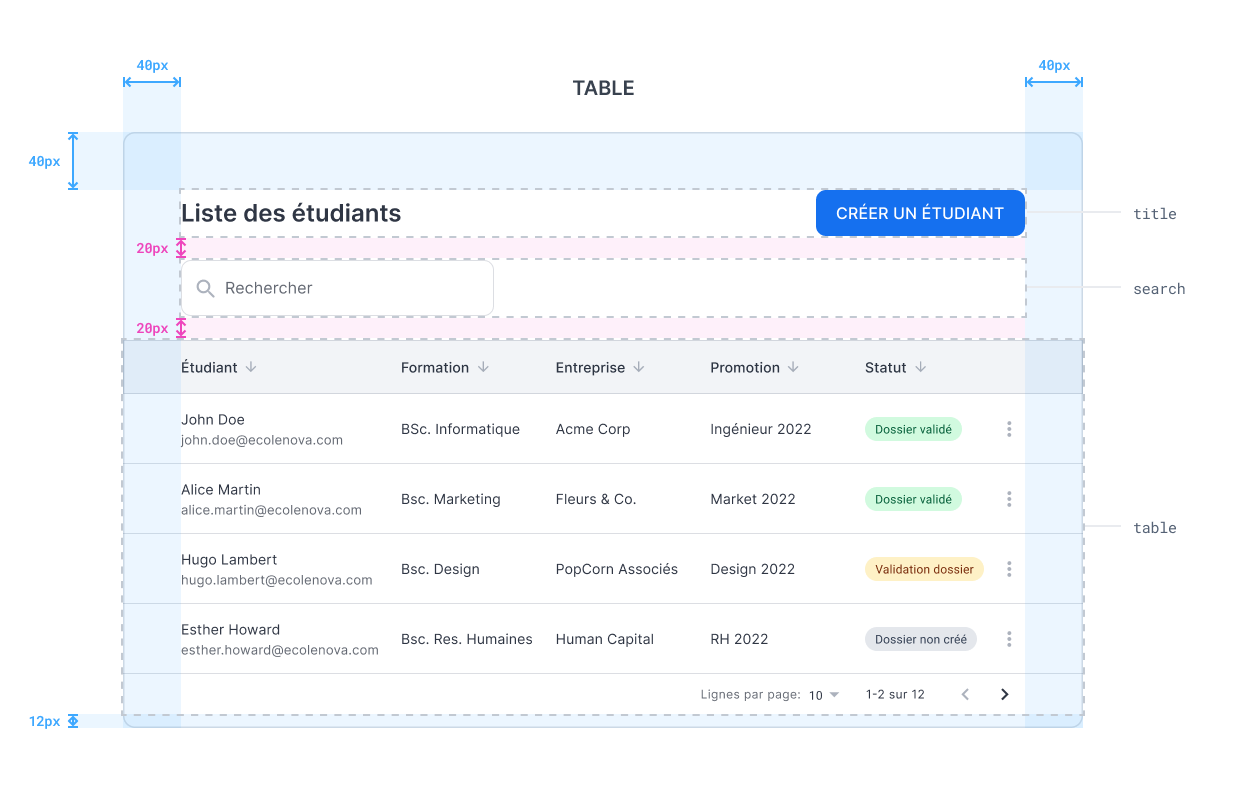
The interface was designed using an 8-point grid system to standardize spacing, alignment, and sizing. This approach ensures visual consistency across screens and enables precise, pixel-accurate and responsive interfaces
Error-tolerant by design
To prevent errors and user mistakes, we introduced input formatting and submission validation to reduce overall errors and incorrect data in the form.

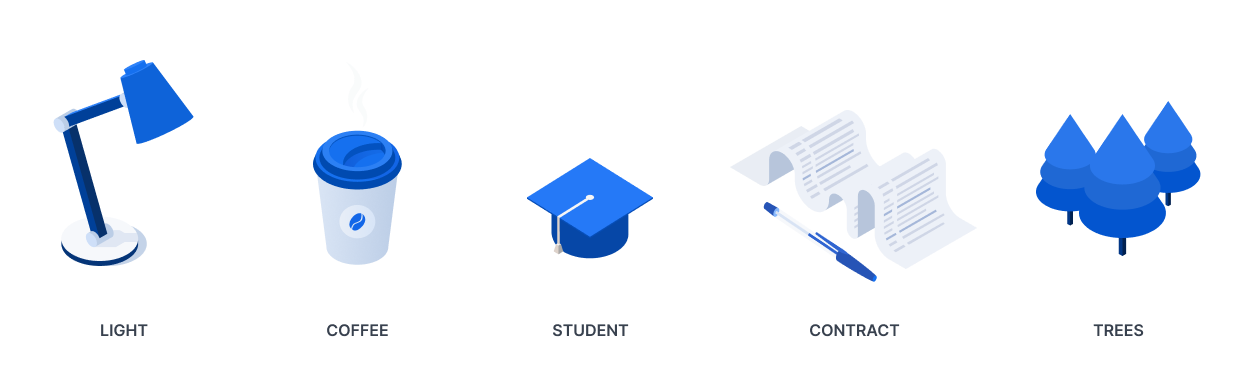
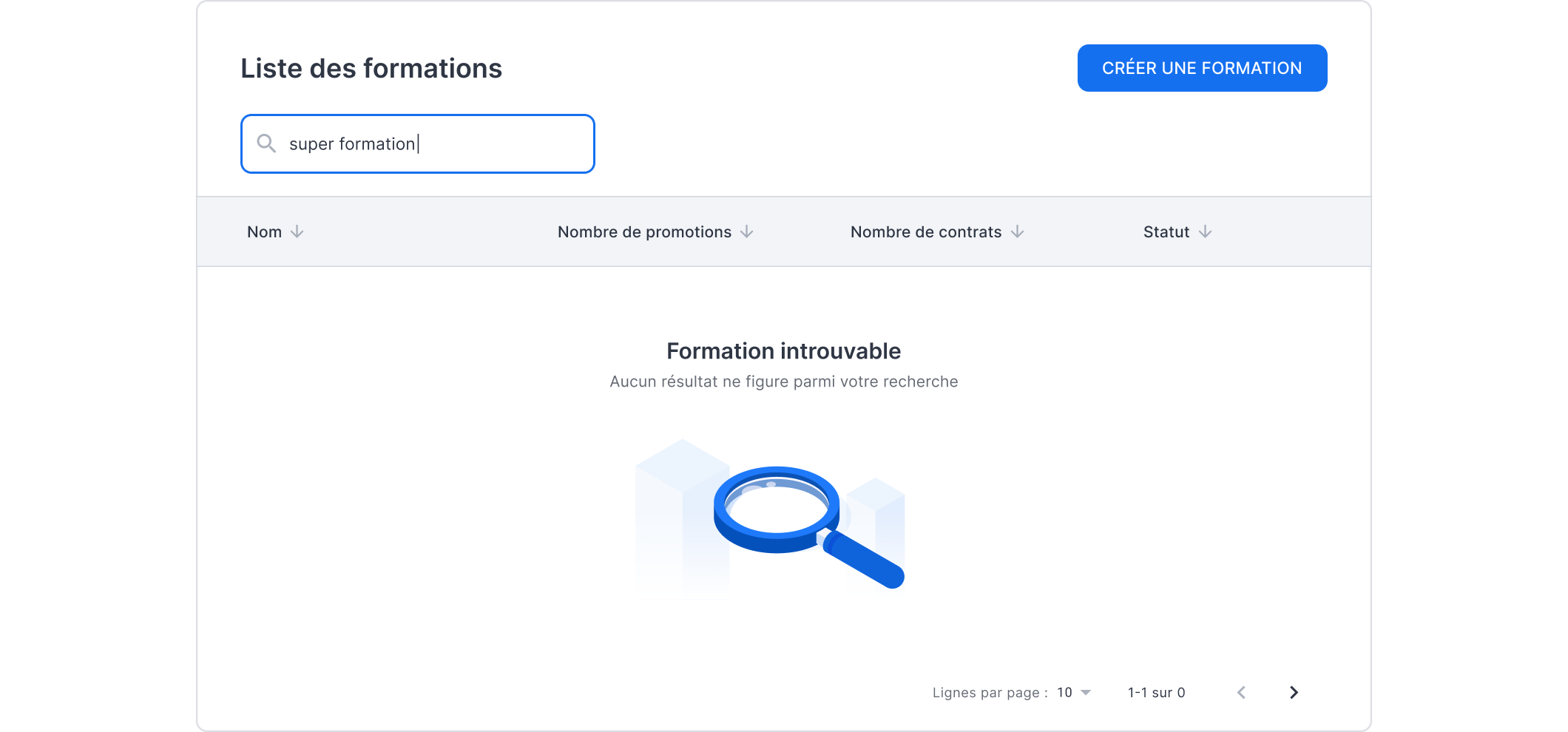
Product illustration – Breaking down administrative concepts with illustration
We used an isometric illustration library to create abstract administrative composition into clear, relatable analogies.

RESULTS
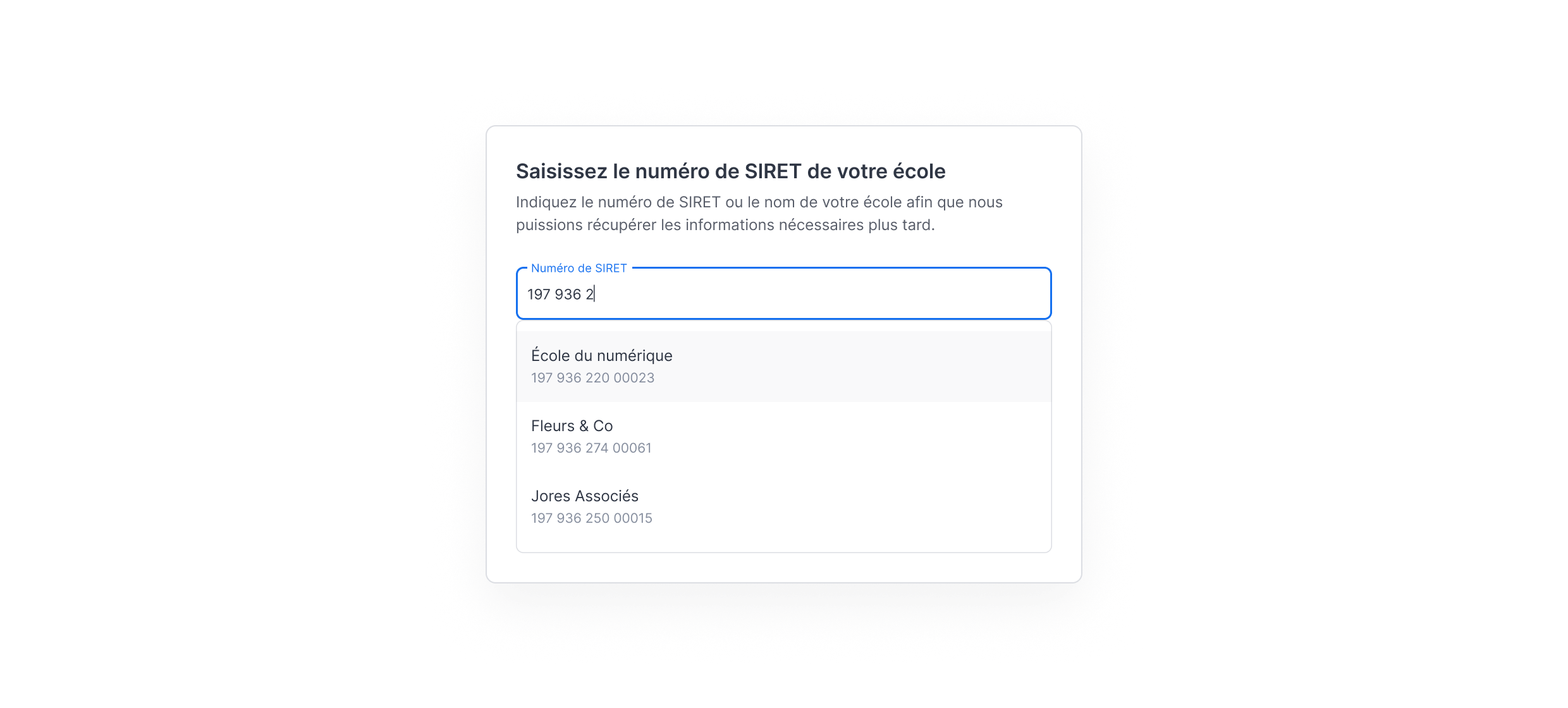
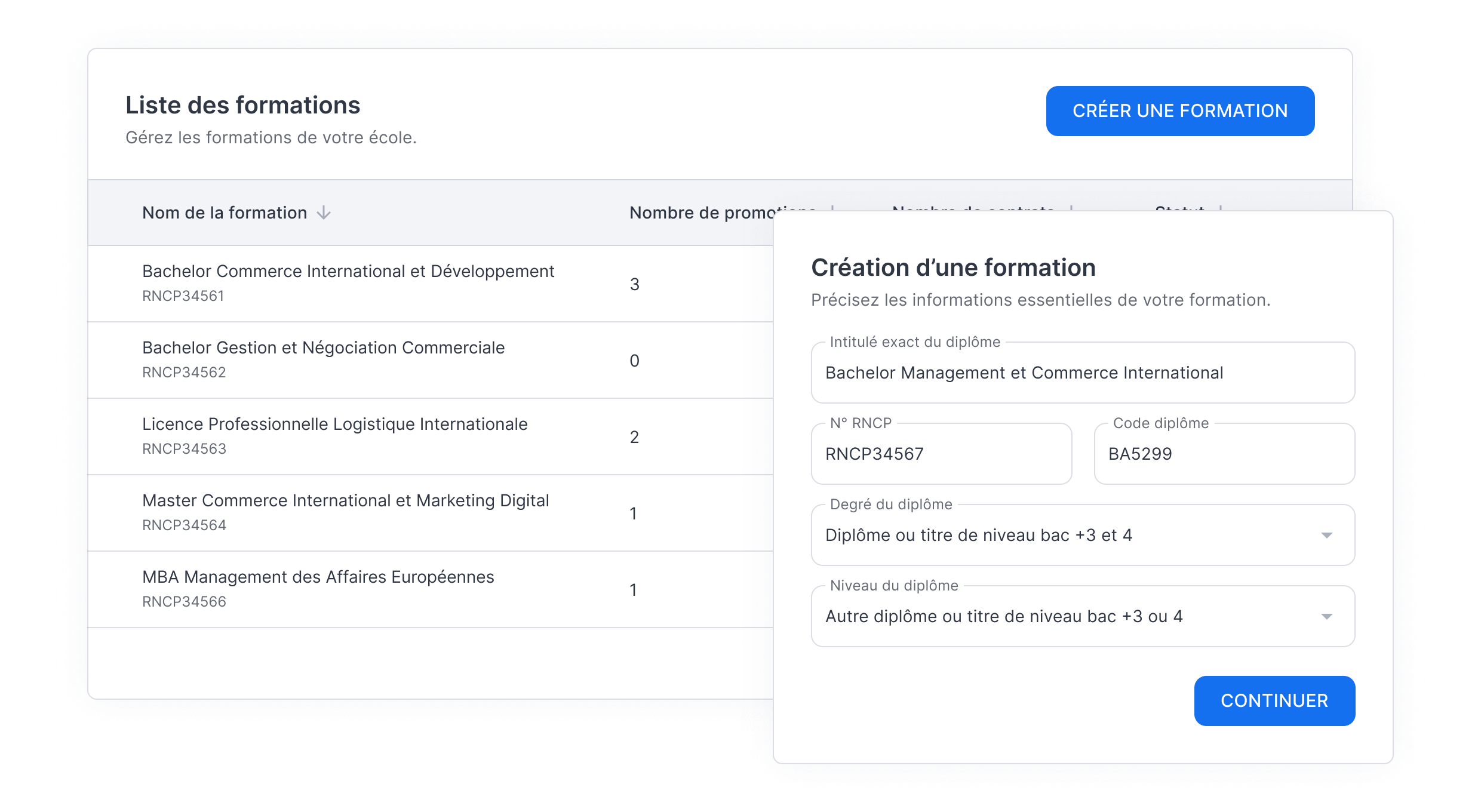
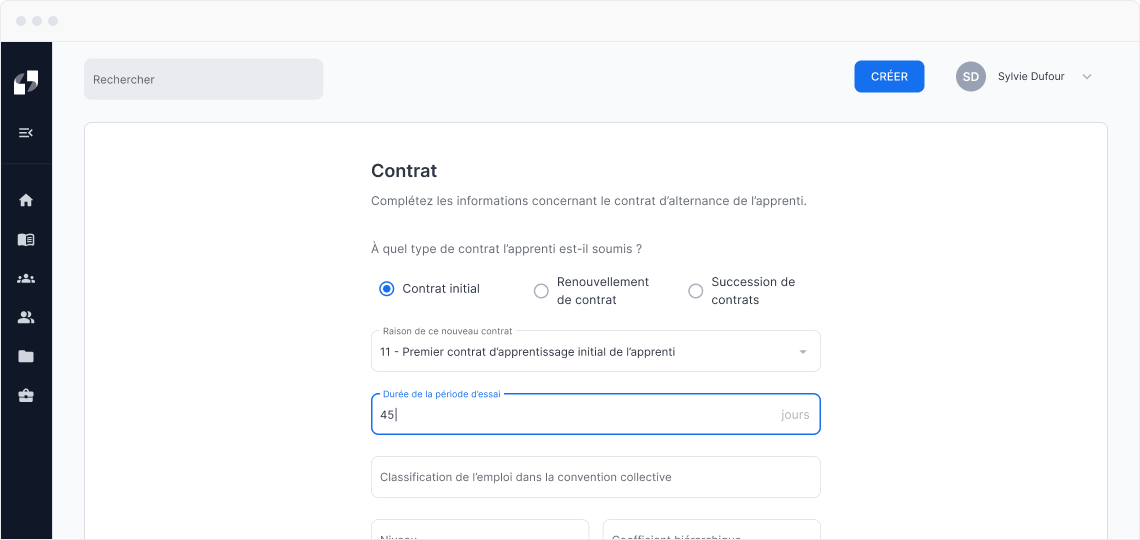
What we shipped.
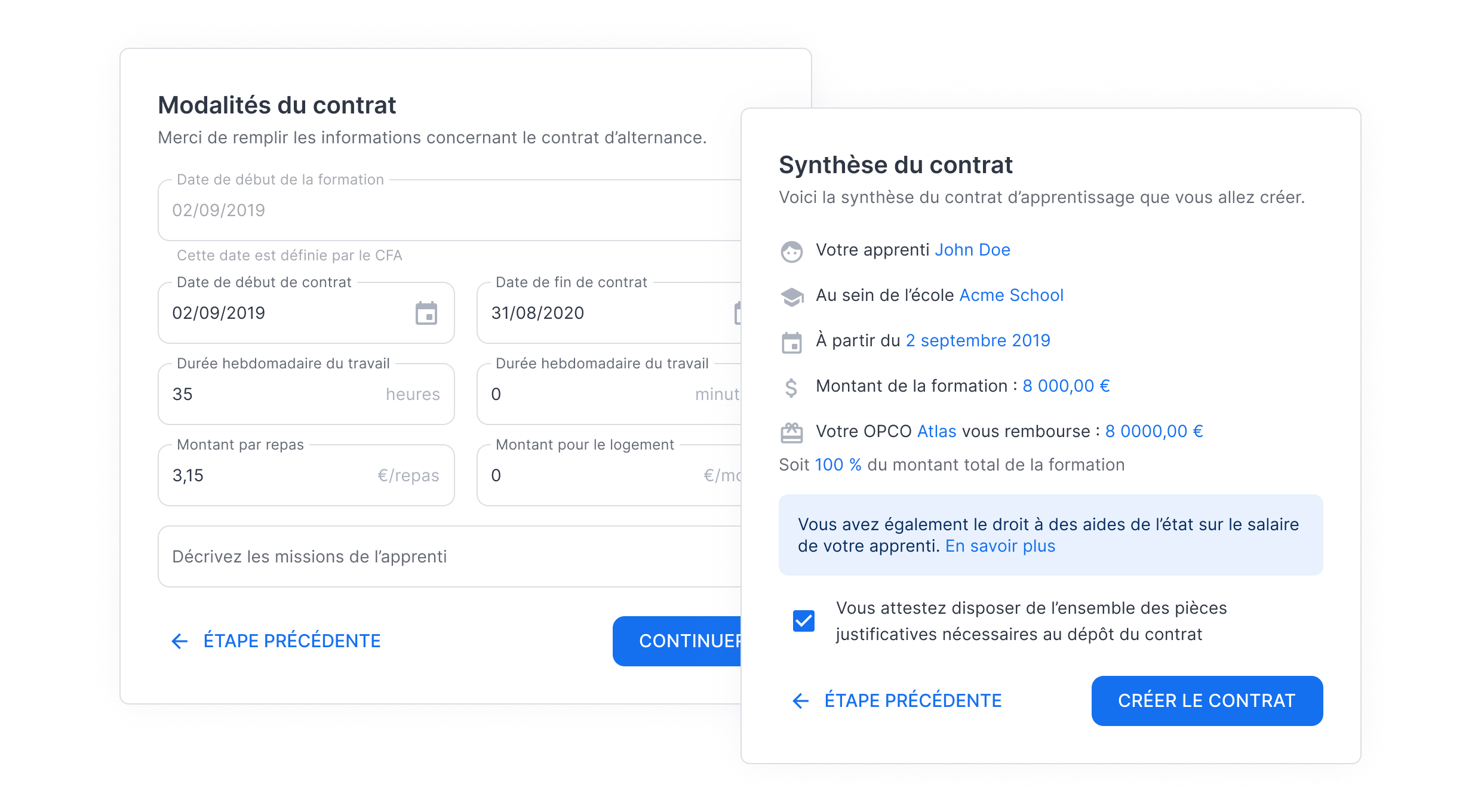
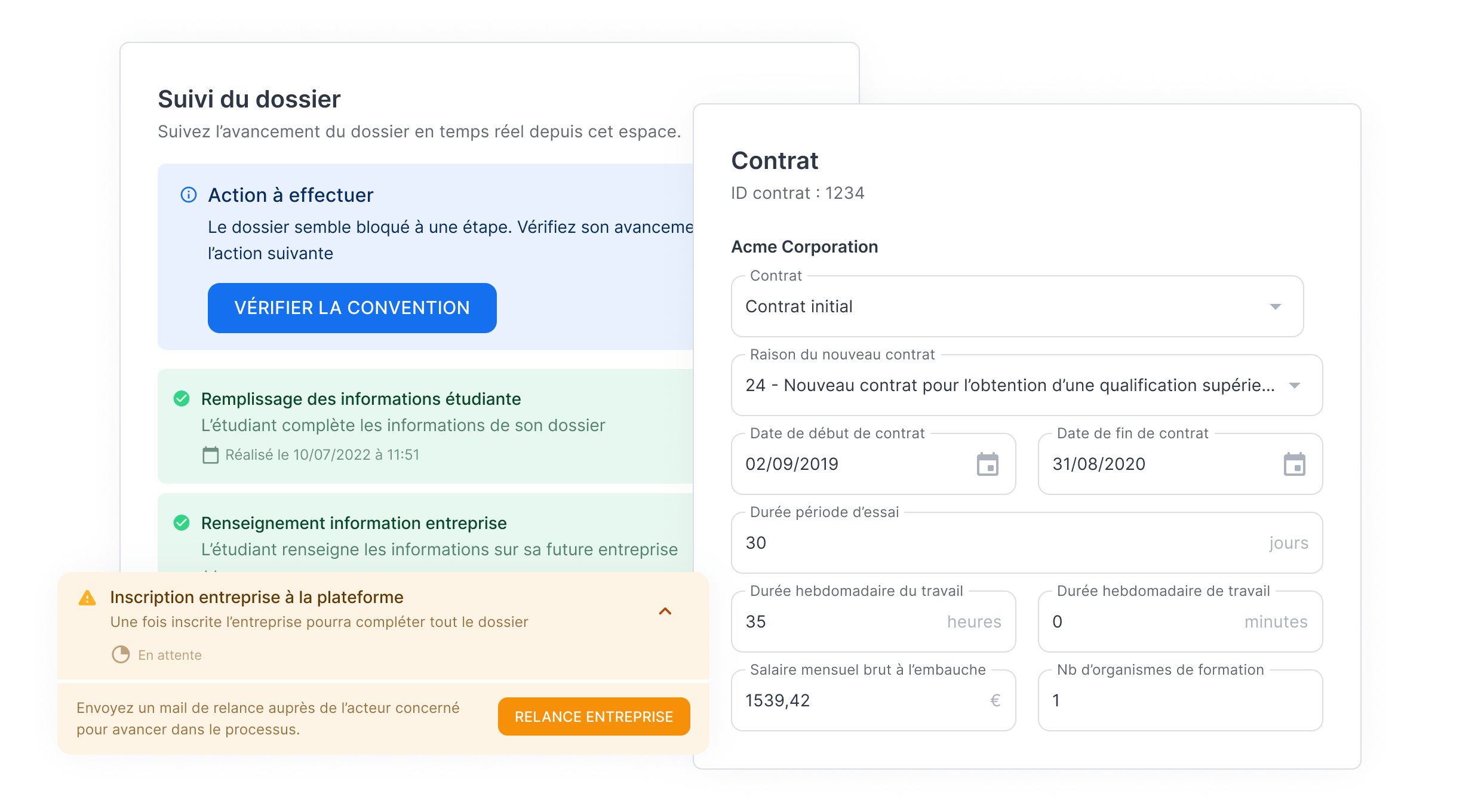
420
training centers used Filiz in 2025
80%
time savings across the business process
+120,000
apprenticeships contracts created

LEARNINGS
What building a product from scratch taught me.
Key learnigns

Designing from 0 to 1
Building a product from scratch taught me to work across the full lifecycle from problem framing to launch while balancing user needs, technical feasibility, and delivery constraints.
Designing under uncertainty
Working in an early-stage startup required designing without complete information, using iteration and validation to move forward.
Thinking in systems, not screens
Beyond interface, I learned to design components, workflows, and patterns that support consistency, scalability, and product evolution.
Next project
UX DESIGN
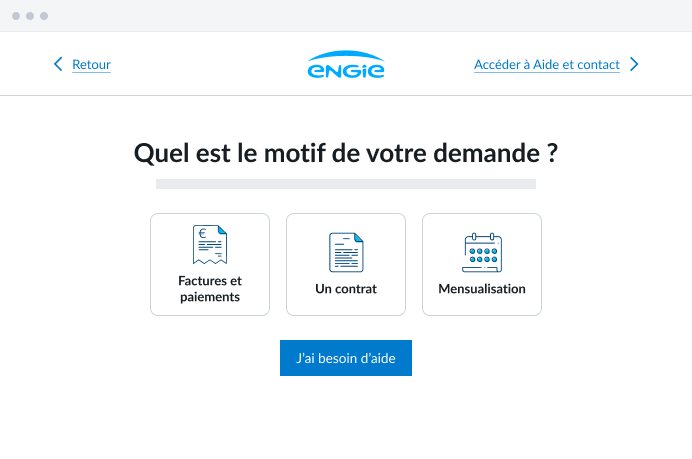
Contact form redesign
Improving customer assistance and reducing customer support overload through UX redesign.
Read case study
Thank you for your interest!
Back to projects
Case study
Simplifying contracts creation
Designed from 0 → 1 Filiz SaaS to streamline contract creation workflows.
Role & Tasks
UX/UI Designer: Qualitative User Research, UX Design, UI Design & Design System
Timeline & Status
8 months (2022)
Shipped
Team
2 Co-founders, 1 SWE, 1 Designer
Project summary
Filiz is a SaaS platform designed to streamline contract creation and simplify administrative workflows for apprenticeship training centers.I joined the startup early on as an apprentice to design the first MVP, from core product experience to the design system, in collaboration with the co-founders.Launched in fall 2022, the product was quickly adopted by 10+ schools within a year, generating $100K+ in revenue.
CONTEXT
The growth of apprenticeships on the job market.
High growth potential for apprenticeship hitting new records.
Chart: Growth in the number of apprenticeship contracts in the private sector
Sources: Vie publique & Communiqué de presse du Ministère du travail de la santé et des solidarités
First observations about apprenticeship contracts
Apprenticeship contracts involve three different stakeholders, making the process particularly complex.`
The contract process is outdated and relies on a paper-based public-sector form.
Limited visibility and dependency on OPCO approval create uncertainty around training funding.
This is how does the paper form looks like
As a result, schools are experimenting

Low engagement from stakeholders in the process

Negative ROI due to time consuming tasks
Problem statement
DESIGN PROCESS
Design with speed & quick iteration.
Our goal was to build a MVP to quickly find PMF. The design process consisted in short and quick iteration loops in a broader lean approach adopted from co-founders.
User Research
Understanding current process and workflow.

Design
Designing and prototyping features.

Define
Defining features and product requirements through user stories.
DISCOVERY
Get to know the apprenticeship ecosystem.
Highly flexible and uncertain process
From a workflow flow, we learned that apprenticeship process remains highly flexible and differs from one school to another.

Step 1
Step 2
Step 3
Step 4
Step 5
Key insights from our user interview
Corporate relations officers experience high mental load due to the complexity, volume, and coordination of contract-related tasks.
Many contract-related tasks are repetitive and time-consuming, increasing operational overhead.
Limited visibility into contract status creates uncertainty due to fragmented roles and responsibilities.
Primary product-user archetpyes
Insights from the interview helped us define our first product archetypes, used as a reference to align design decisions throughout the project.
Primary
Sylvie D.
38, Corporate Relations Officer
With nearly six years of experience, Sylvie has developed strong expertise across the full range of administrative processes.
Motivations
- Free up time for high-value tasks where her expertise truly benefits the school
- Increase efficiency when handling repetitive administrative work
Pain points
- Having to follow up with students or companies to track contract progress
- Identifying errors in contracts late in the process
Secondary
Gilles L.
42, CEO of a thermal insulation company
After completing his studies, Gilles founded a thermal insulation company for buildings. Today, his company operates nationwide.
Motivations
- Save time when filling out apprenticeship contracts
- Access financial incentives for hiring apprentices
Pain points
- Tracking payments he is expected to receive
- Having to register to multiples tools to manage apprenticeship contracts
USER EXPERIENCE
Rationalizing a complex process.
Redesigning the contract process
Starting from an unstructured process that varies across schools, first step was to rationalize the contract creation workflow.
From inventory to user flows
From the original paper form, we conducted an inventory of required fields to reorganize the information and then create user flows.
Sharing responsibilities across stakeholders
These flows rely on a shared set of core features, ensuring consistency across the product.
They also redistribute responsibilities by involving both the company and the student, reducing the operational burden placed on schools.
School as the orchestrator
The school remains an oversight role within the process, supported by tools that provide fine-grained monitoring and control of contracts at scale.
The backbone of the process
The app is structured around six core features that form the functional foundation of the process.
A step-by-step process
The process is broken down into successive, asynchronous steps using staged disclosure allowing to segment tasks and distributing cognitive effort over time.
DESIGN & LAYOUT
Laying down foundations for the app.
Leveraging familiar SaaS patterns
By relying on familiar patterns, the interface leverages existing mental models, reducing onboarding effort and helping users navigate the product with confidence.
Data tables to provide overview and control
Data tables were chosen to display contract entries and key metadata. They give schools a clear overview of their operations and enable efficient monitoring and control at scale.
Forms – finding balance between usability and technical constraints
As forms sit at the core of the product experience, multiple layouts were explored to balance usability and development constraints.
A grid-based layout was selected for its flexibility, functional clarity, and low implementation cost.
Isolated
Visual Focused
Visual appeal through illustration, strengthening brand identity.
Left-aligned layout can affect comfort.
Integrated
Functional Focused
Grid-based layout supports flexible composition.
Full-width content improves focus.
Making forms suitable for legibility and scannability
Forms include a stepper for status and progress with fields grouped by theme. The layout improves readability and scannability from completion to review.
DESIGN & LAYOUT
Building the application’s layer.
Set-up a scalable design system
To reduce design effort and UI debt, we relied on a component-based design system that allows us to save hundreds of hours of UI design.
With Material UI, we defined design tokens following brand guidelines for components bulk update while ensuring consistency and long-term scalability.
Leveraging Material Design look & feel
By leveraging MUI, the interface benefits from familiar Material Design patterns, improving usability and learnability.
Accessibility best practices are embedded by default, ensuring readable contrast and accessible interactions.
Precise and consistent interface
The interface was designed using an 8-point grid system to standardize spacing, alignment, and sizing. This approach ensures visual consistency across screens and enables precise, pixel-accurate and responsive interfaces
Error-tolerant by design
To prevent errors and user mistakes, we introduced input formatting and submission validation to reduce overall errors and incorrect data in the form.
Product illustration – Breaking down administrative concepts with illustration
We used an isometric illustration library to create abstract administrative composition into clear, relatable analogies.
RESULTS
What we shipped.
420
training centers used Filiz in 2025
80%
time savings across the business process
+120,000
apprenticeships contracts created
LEARNINGS
What building a product from scratch taught me.
Key learnigns
Designing from 0 to 1
Building a product from scratch taught me to work across the full lifecycle from problem framing to launch while balancing user needs, technical feasibility, and delivery constraints.
Designing under uncertainty
Working in an early-stage startup required designing without complete information, using iteration and validation to move forward.
Thinking in systems, not screens
Beyond interface, I learned to design components, workflows, and patterns that support consistency, scalability, and product evolution.
Next project
UX DESIGN
Contact form redesign
Improving customer assistance and reducing customer support overload through UX redesign.
Read case study
Thank you for your interest!
Back to projects
Case study
Simplifying contracts creation
Designed from 0 → 1 Filiz SaaS to streamline contract creation workflows.
Role & Tasks
UX/UI Designer: Qualitative User Research, UX Design, UI Design & Design System
Timeline & Status
8 months (2022)
Shipped
Team
2 Co-founders, 1 SWE, 1 Designer
Project summary
Filiz is a SaaS platform designed to streamline contract creation and simplify administrative workflows for apprenticeship training centers.I joined the startup early on as an apprentice to design the first MVP, from core product experience to the design system, in collaboration with the co-founders.Launched in fall 2022, the product was quickly adopted by 10+ schools within a year, generating $100K+ in revenue.

CONTEXT
The growth of apprenticeships on the job market.
High growth potential for apprenticeship hitting new records.
Chart: Growth in the number of apprenticeship contracts in the private sector
Sources: Vie publique & Communiqué de presse du Ministère du travail de la santé et des solidarités
First observations about apprenticeship contracts
Apprenticeship contracts involve three different stakeholders, making the process particularly complex.`

The contract process is outdated and relies on a paper-based public-sector form.
Limited visibility and dependency on OPCO approval create uncertainty around training funding.
This is how does the paper form looks like
As a result, schools are experimenting

Low engagement from stakeholders in the process

Negative ROI due to time consuming tasks
Problem statement

DESIGN PROCESS
Design with speed & quick iteration.
Our goal was to build a MVP to quickly find PMF. The design process consisted in short and quick iteration loops in a broader lean approach adopted from co-founders.
User Research
Understanding current process and workflow.
Design
Designing and prototyping features.
Define
Defining features and product requirements through user stories.

DISCOVERY
Get to know the apprenticeship ecosystem.
Highly flexible and uncertain process
From a workflow flow, we learned that apprenticeship process remains highly flexible and differs from one school to another.

Step 1
Step 2
Step 3
Step 4
Step 5
Key insights from our user interview

Corporate relations officers experience high mental load due to the complexity, volume, and coordination of contract-related tasks.

Many contract-related tasks are repetitive and time-consuming, increasing operational overhead.

Limited visibility into contract status creates uncertainty due to fragmented roles and responsibilities.
Primary product-user archetpyes
Insights from the interview helped us define our first product archetypes, used as a reference to align design decisions throughout the project.
Primary
Sylvie D.
38, Corporate Relations Officer
With nearly six years of experience, Sylvie has developed strong expertise across the full range of administrative processes.
Motivations
- Free up time for high-value tasks where her expertise truly benefits the school
- Increase efficiency when handling repetitive administrative work
Pain points
- Having to follow up with students or companies to track contract progress
- Identifying errors in contracts late in the process
Secondary
Gilles L.
42, CEO of a thermal insulation company
After completing his studies, Gilles founded a thermal insulation company for buildings. Today, his company operates nationwide.
Motivations
- Save time when filling out apprenticeship contracts
- Access financial incentives for hiring apprentices
Pain points
- Tracking payments he is expected to receive
- Having to register to multiples tools to manage apprenticeship contracts

USER EXPERIENCE
Rationalizing a complex process.
Redesigning the contract process
Starting from an unstructured process that varies across schools, first step was to rationalize the contract creation workflow.
From inventory to user flows
From the original paper form, we conducted an inventory of required fields to reorganize the information and then create user flows.
Sharing responsibilities across stakeholders
These flows rely on a shared set of core features, ensuring consistency across the product.
They also redistribute responsibilities by involving both the company and the student, reducing the operational burden placed on schools.
School as the orchestrator
The school remains an oversight role within the process, supported by tools that provide fine-grained monitoring and control of contracts at scale.
The backbone of the process
The app is structured around six core features that form the functional foundation of the process.
A step-by-step process
The process is broken down into successive, asynchronous steps using staged disclosure allowing to segment tasks and distributing cognitive effort over time.

DESIGN & LAYOUT
Laying down foundations for the app.
Leveraging familiar SaaS patterns
By relying on familiar patterns, the interface leverages existing mental models, reducing onboarding effort and helping users navigate the product with confidence.
Data tables to provide overview and control
Data tables were chosen to display contract entries and key metadata. They give schools a clear overview of their operations and enable efficient monitoring and control at scale.
Forms – finding balance between usability and technical constraints
As forms sit at the core of the product experience, multiple layouts were explored to balance usability and development constraints.
A grid-based layout was selected for its flexibility, functional clarity, and low implementation cost.
Isolated
Visual Focused

Visual appeal through illustration, strengthening brand identity.

Left-aligned layout can affect comfort.
Integrated
Functional Focused

Grid-based layout supports flexible composition.

Full-width content improves focus.
Making forms suitable for legibility and scannability
Forms include a stepper for status and progress with fields grouped by theme. The layout improves readability and scannability from completion to review.
DESIGN & LAYOUT
Building the application’s layer.
Set-up a scalable design system
To reduce design effort and UI debt, we relied on a component-based design system that allows us to save hundreds of hours of UI design.
With Material UI, we defined design tokens following brand guidelines for components bulk update while ensuring consistency and long-term scalability.
Leveraging Material Design look & feel
By leveraging MUI, the interface benefits from familiar Material Design patterns, improving usability and learnability.
Accessibility best practices are embedded by default, ensuring readable contrast and accessible interactions.
Precise and consistent interface
The interface was designed using an 8-point grid system to standardize spacing, alignment, and sizing. This approach ensures visual consistency across screens and enables precise, pixel-accurate and responsive interfaces
Error-tolerant by design
To prevent errors and user mistakes, we introduced input formatting and submission validation to reduce overall errors and incorrect data in the form.
Product illustration – Breaking down administrative concepts with illustration
We used an isometric illustration library to create abstract administrative composition into clear, relatable analogies.

RESULTS
What we shipped.
420
training centers used Filiz in 2025
80%
time savings across the business process
+120,000
apprenticeships contracts created
LEARNINGS
What building a product from scratch taught me.
Key learnigns

Designing from 0 to 1
Building a product from scratch taught me to work across the full lifecycle from problem framing to launch while balancing user needs, technical feasibility, and delivery constraints.
Designing under uncertainty
Working in an early-stage startup required designing without complete information, using iteration and validation to move forward.
Thinking in systems, not screens
Beyond interface, I learned to design components, workflows, and patterns that support consistency, scalability, and product evolution.
Next project
UX DESIGN
Contact form redesign
Improving customer assistance and reducing customer support overload through UX redesign.
Read case study
Thank you for your interest!
Back to projects