Case study
Contact form redesign
Redesigning ENGIE’s contact form to improve customer assistance and reduce customer support overload.
Role & Tasks
UX Designer: UX Analytics, Heuristic Analysis, UX Design
Timeline & Status
3 months (2025)
Shipped
Team
1 Project Manager, 1 UX Designer, 1 UX Writer, 1 UI Designer, 2 Devs
Project summary
In 2025, ENGIE’s customer support team pinpointed a high reiteration rate of customer help requests generating costs and impacting customer satisfaction.
During my apprenticeship, I’ve worked with the Help & Support Team to identify pain points and co-create a new experience for the web contact form.
The contact form was shipped in mars 2025 and launched few months after my apprenticeship ends making difficult to see the impact on OKR.

PROBLEM SPACE
Customer support became highly expensive.
We noticed a high reiteration rate following customer requests
1 out of 5
help request are repeated with support.
1/3
customer not satisfied following help request.
Half of the customer requests relates to billing
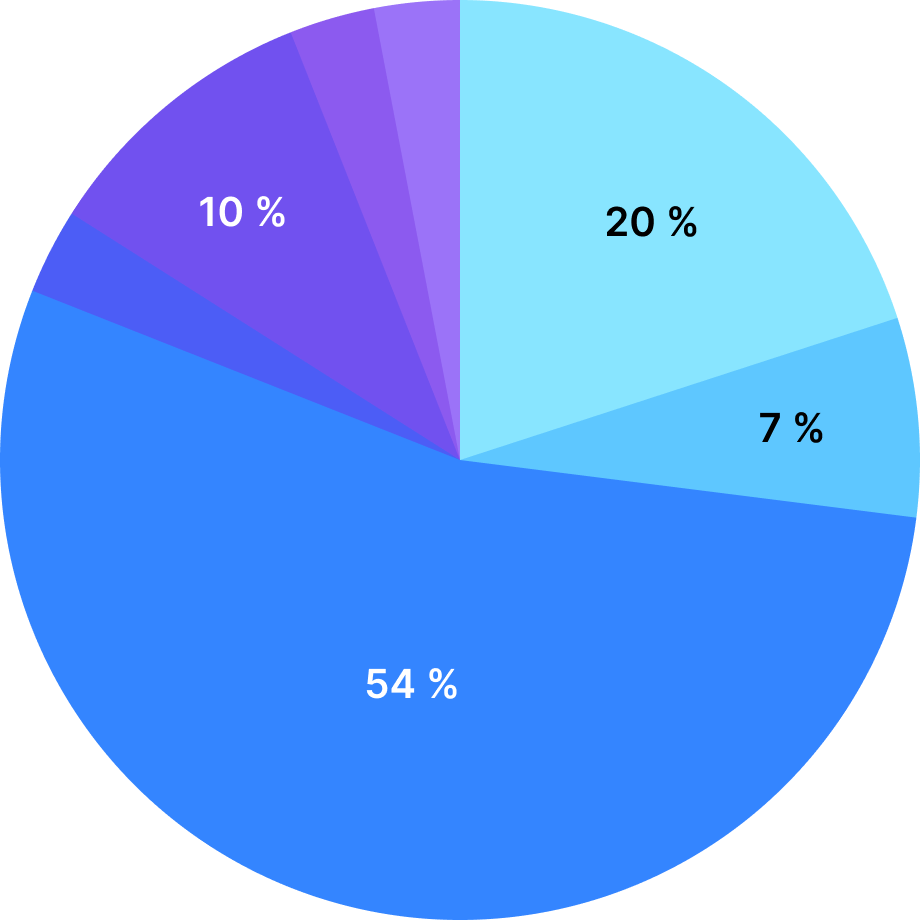
Technical assistance
Other
Contracts (20%)
ENGIE’s engagement (7%)
Billing & invoicing (54%)
Intervention & troubleshooting
Offers & services (10%)
Consumption reading meter
As a result, we’re seeing...

An increase in customer dissatisfaction.

Higher processing costs per support request.
So what are we trying to solve?
Problem statement

OJBECTIVES
Key challenges & North Star Metrics

Streamline the user experience and improve clarity.

Reduce the rate of help requests reiteration.

Better route requests and optimize response times.
UX ANALYSIS
Making room for improvements.
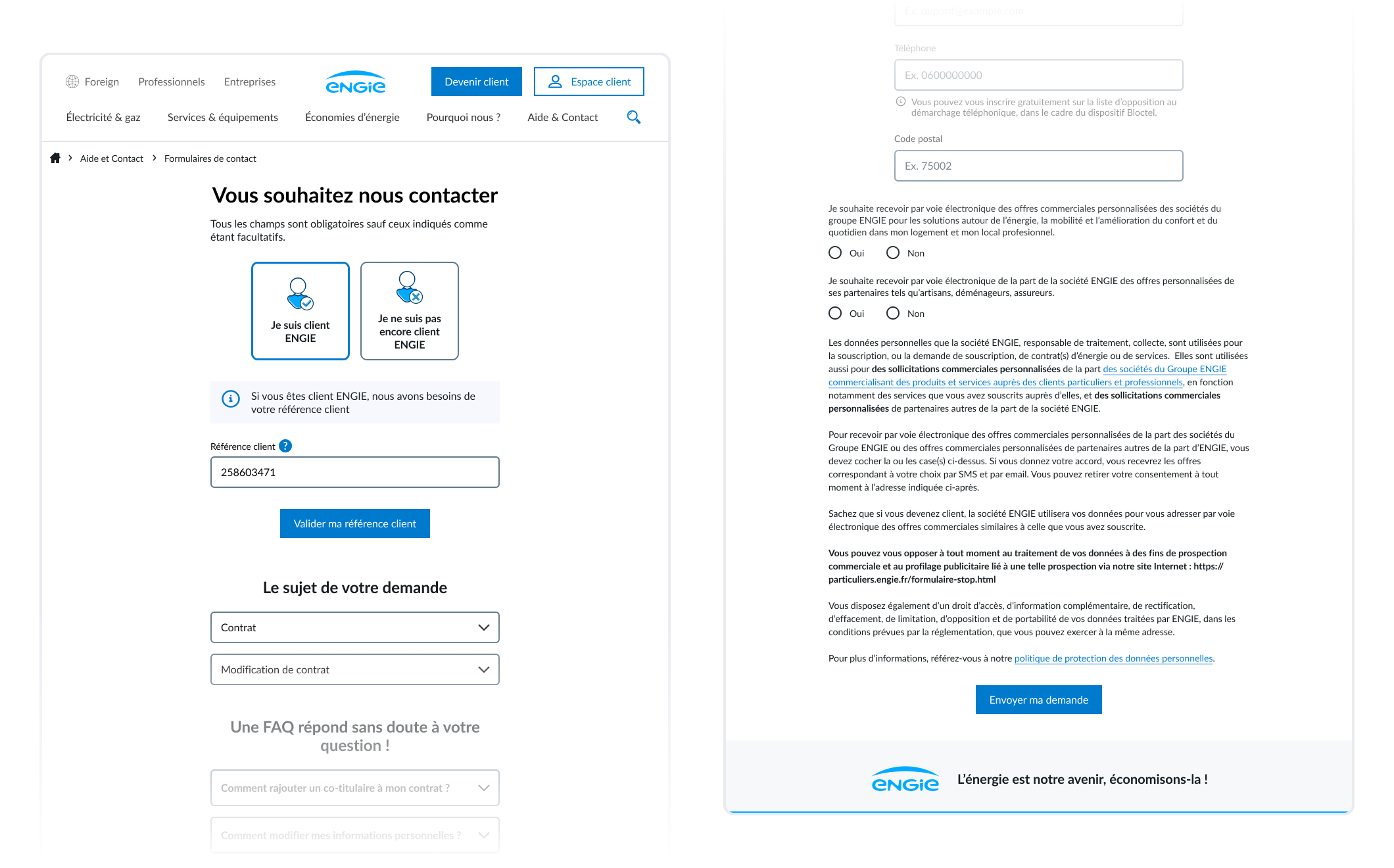
Contact form relies on an excessively long page
The contact form was built as a single page that grows according to user choices, resulting in a very long scrolling experience.
Customer identifier became a barrier to accessing the form
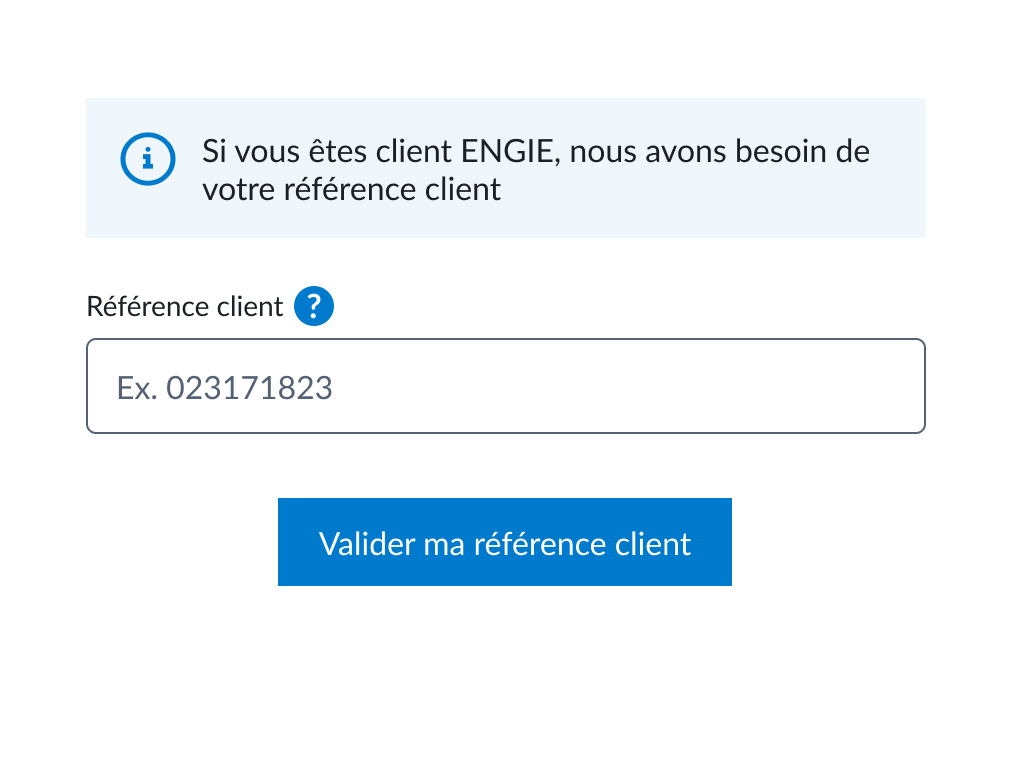

Frequently ignored, this step requires user to look after invoices to get their customer identifier.

Prone to errors, the input field lacks any formatting or validation to prevent mistakes.
Help topics are behind dropdown menus
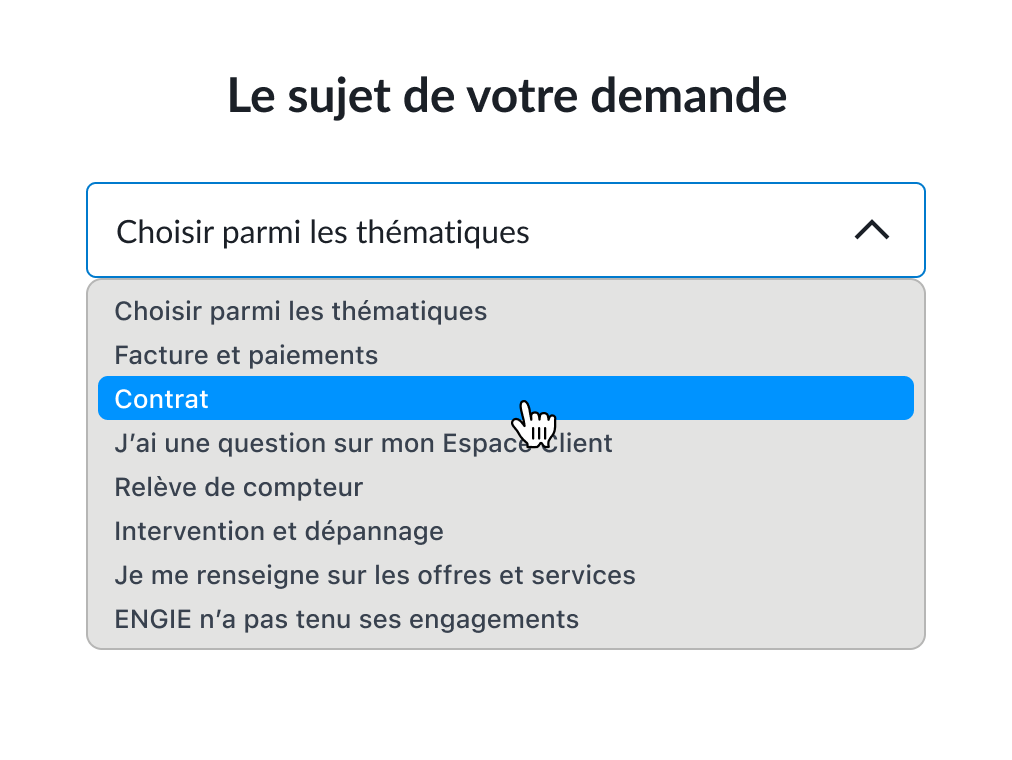

Dropdown menu makes support themes poorly glanceable while having poor usability.

Missing topics and imprecise labels can lead to confusion.
Generic and poorly personalized assistance
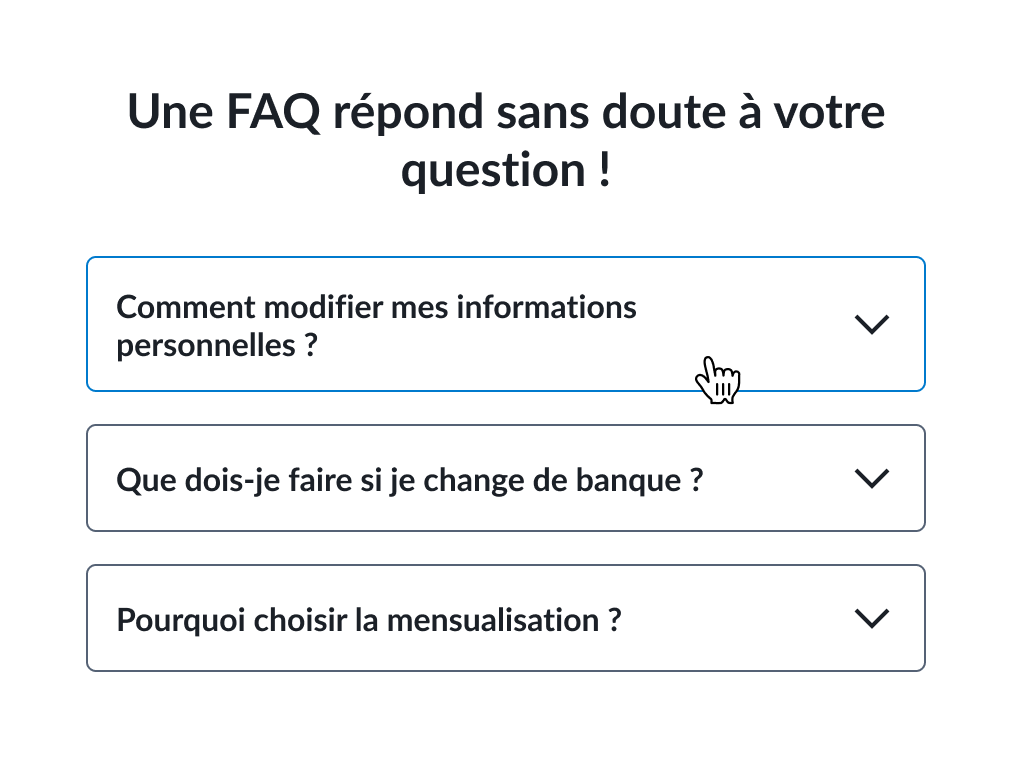

FAQ content lacks relevance to the selected theme.
Component looks like dropdown menu, leading to unclear affordances.
Legal disclaimer following cross-sell section
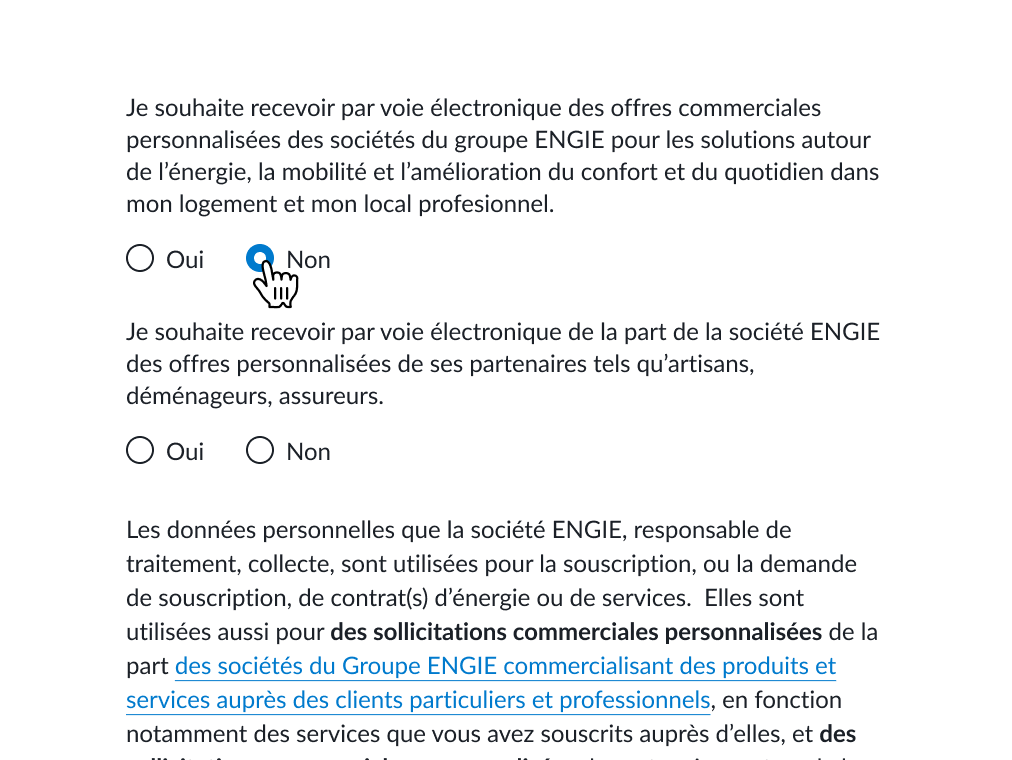
Cross-selling appears unexpectedly at the end of the form, potentially triggering user reactance.

Legal disclaimer is long requiring significant cognitive effort to read.

NEW USER FLOW
Starting from what was already built.
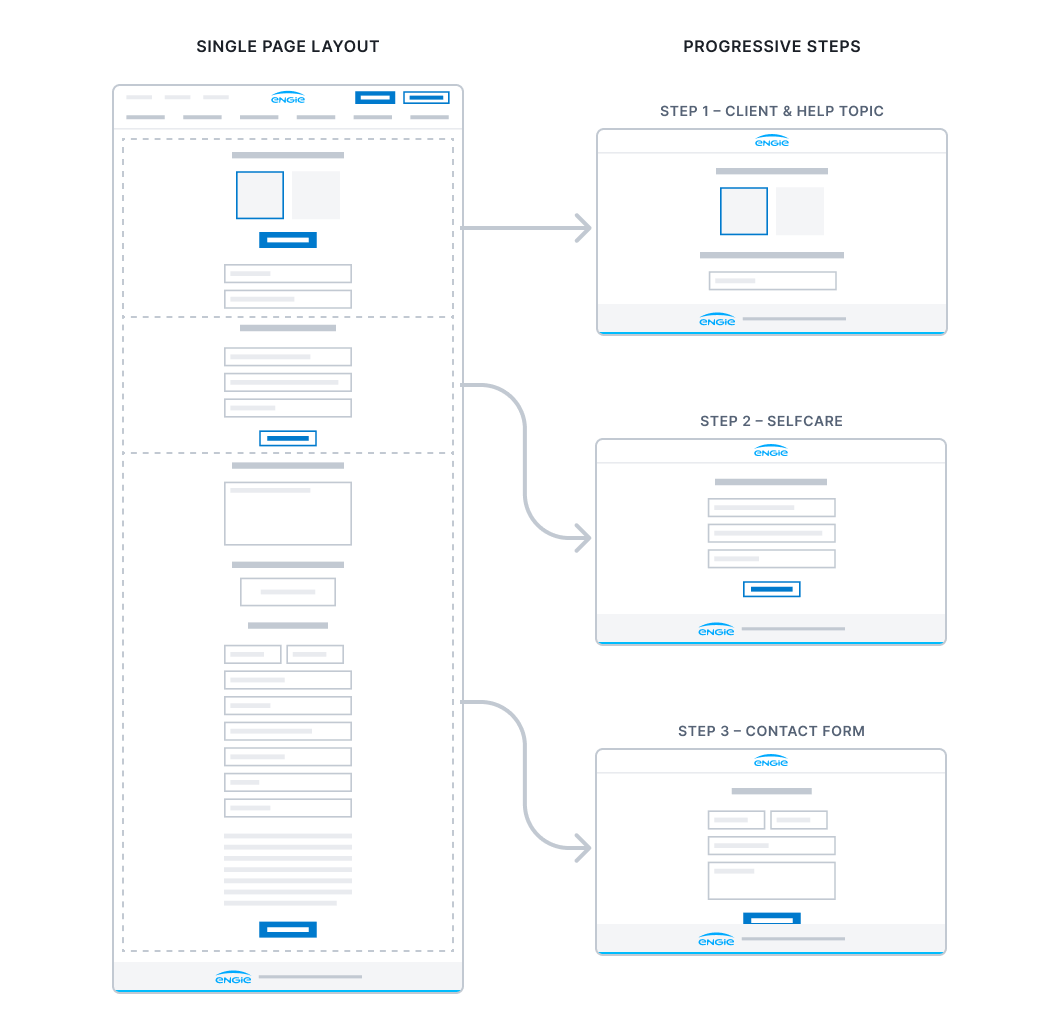
Shifting from single page to progressive steps
As the single-page layout generate high cognitive load combining multiple tasks and steps, we’ve broken down the page into successive steps using the progressive disclosure principle.

STEP 1 – CUSTOMER IDENTIFIER
Fixing the access to the form.
Customer identifier isn’t always required
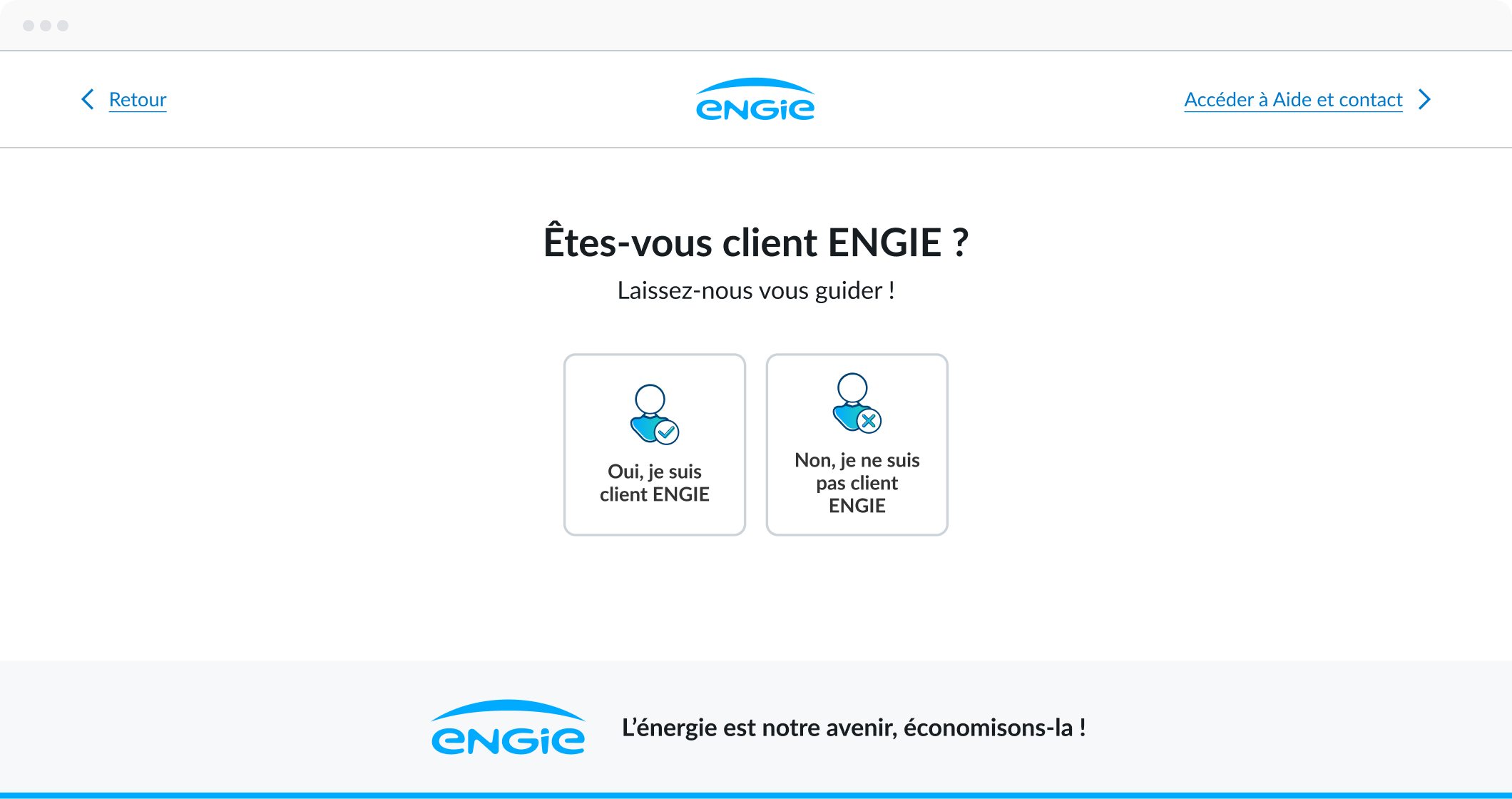
As identifying the customer upfront is not necessary, we’ve introduced a login flow that encourages customers to sign-in while leveraging their customer data.
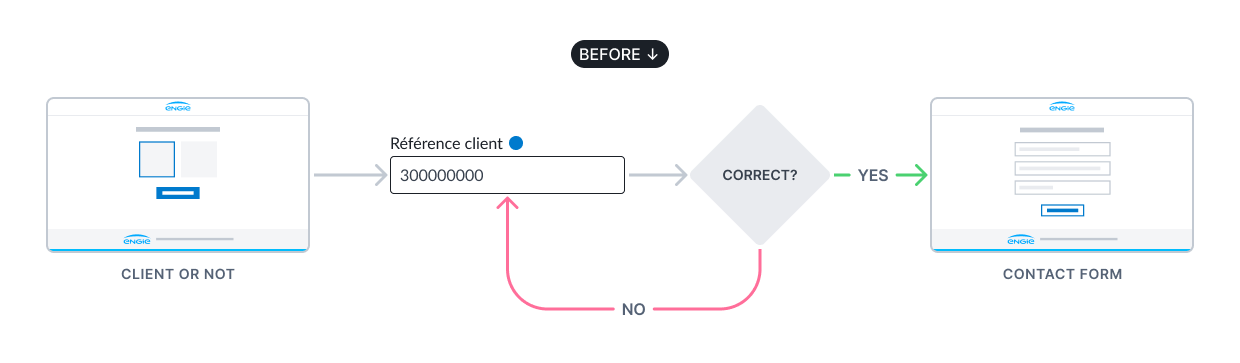
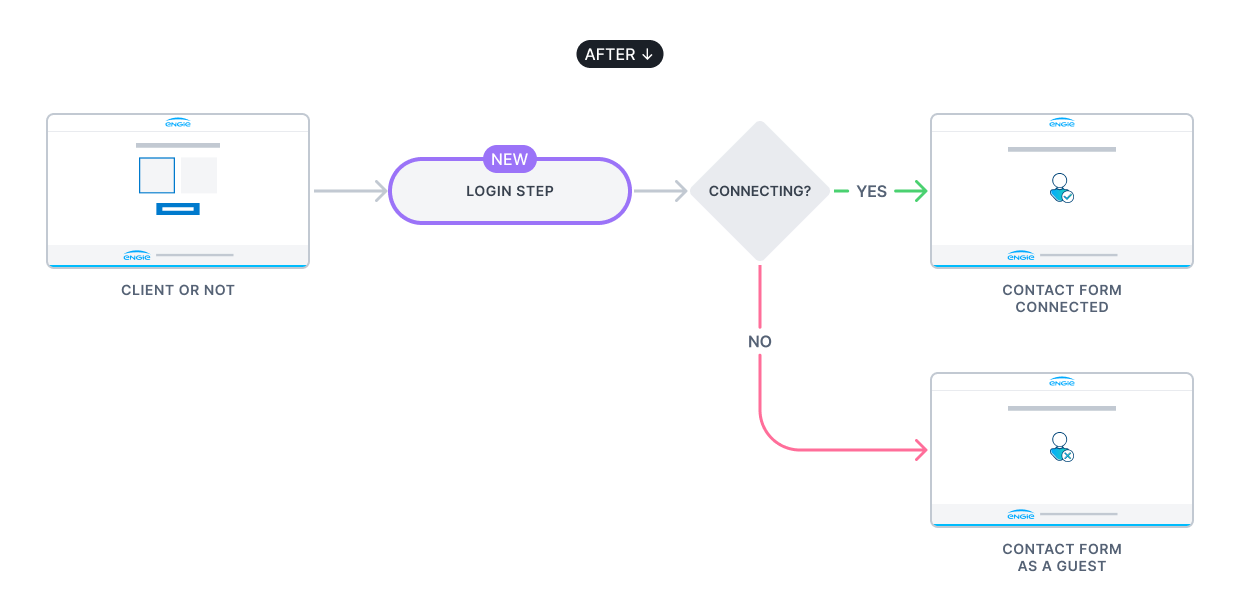
Designing a dedicated login step
To encourage users sign-in we’ve explored different uses cases to picture the user journey through rapid prototyping.
1. An information banner with a hyperlink

Non-blocking for users, who can choose whether or not to sign in.

Low engagement, and therefore likely to be ignored by users.
2. A modal dialog?
May be perceived as intrusive and trigger user reactance.
Technically challenging and expensive to build.
3. Or a dedicated login page?
Follows previous step and can be perceived as part of the user journey.
An existing page, requiring no additional development cost.
May be perceived as a constraining step.
Finding compromise between tech & user experience
Following team discussions, a dedicated login page was identified as a viable trade-off, limiting development cost while keeping sign-in optional for end users.
STEP 2 – HELP TOPICS
Improving legibility.
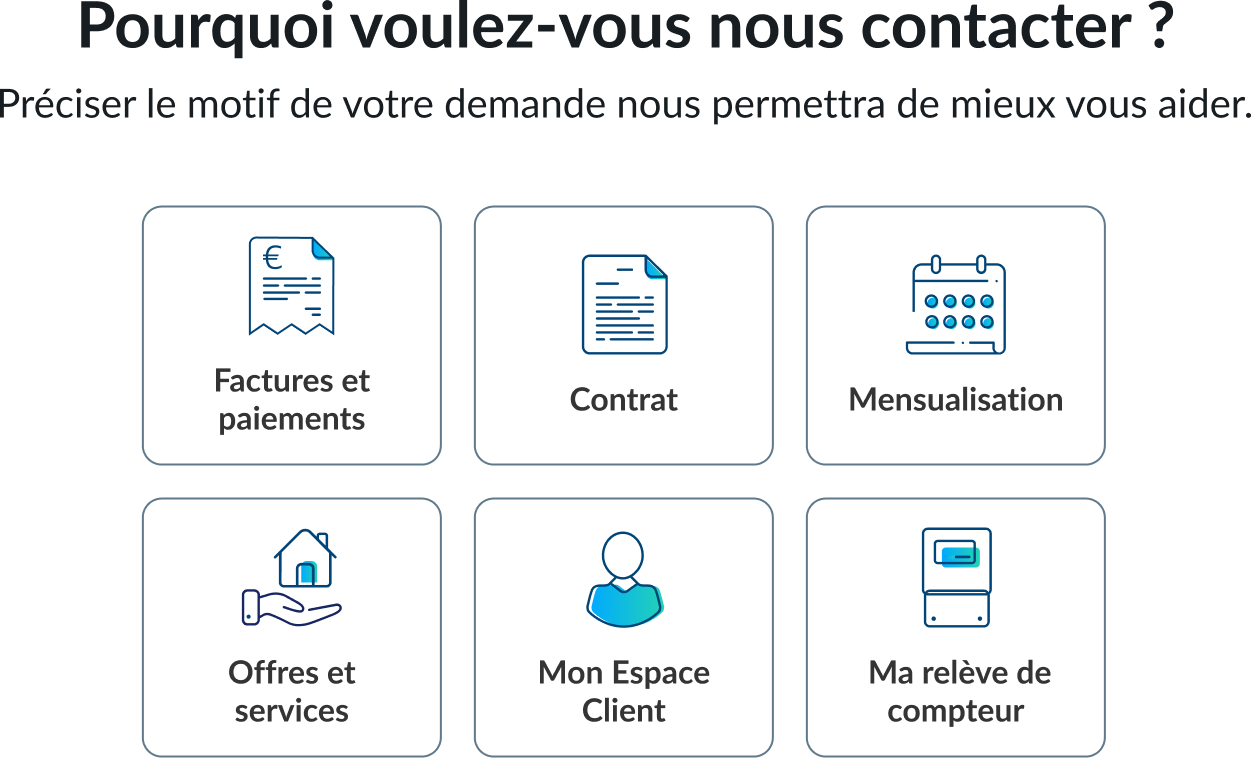
Making help topics more glanceable
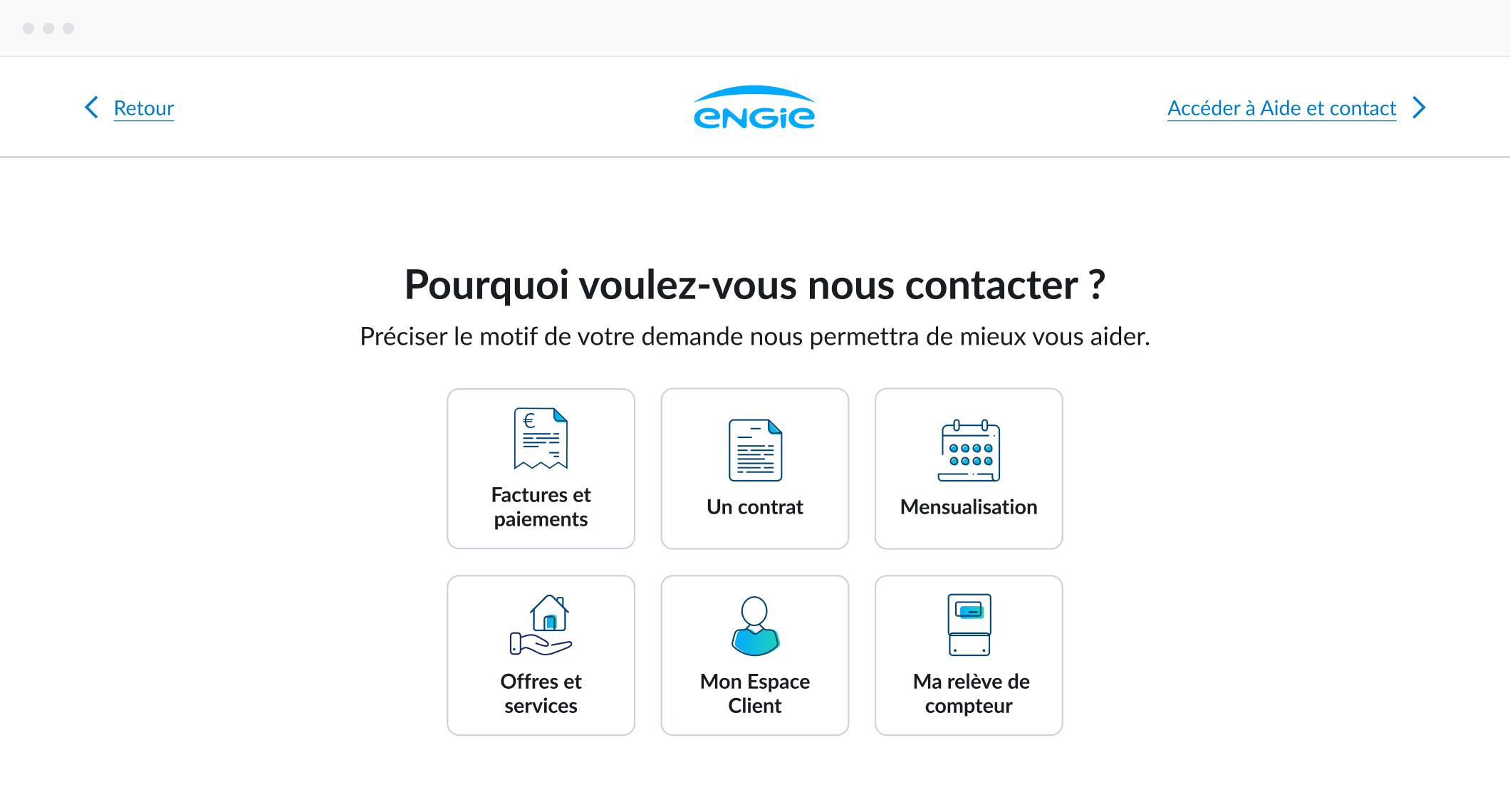
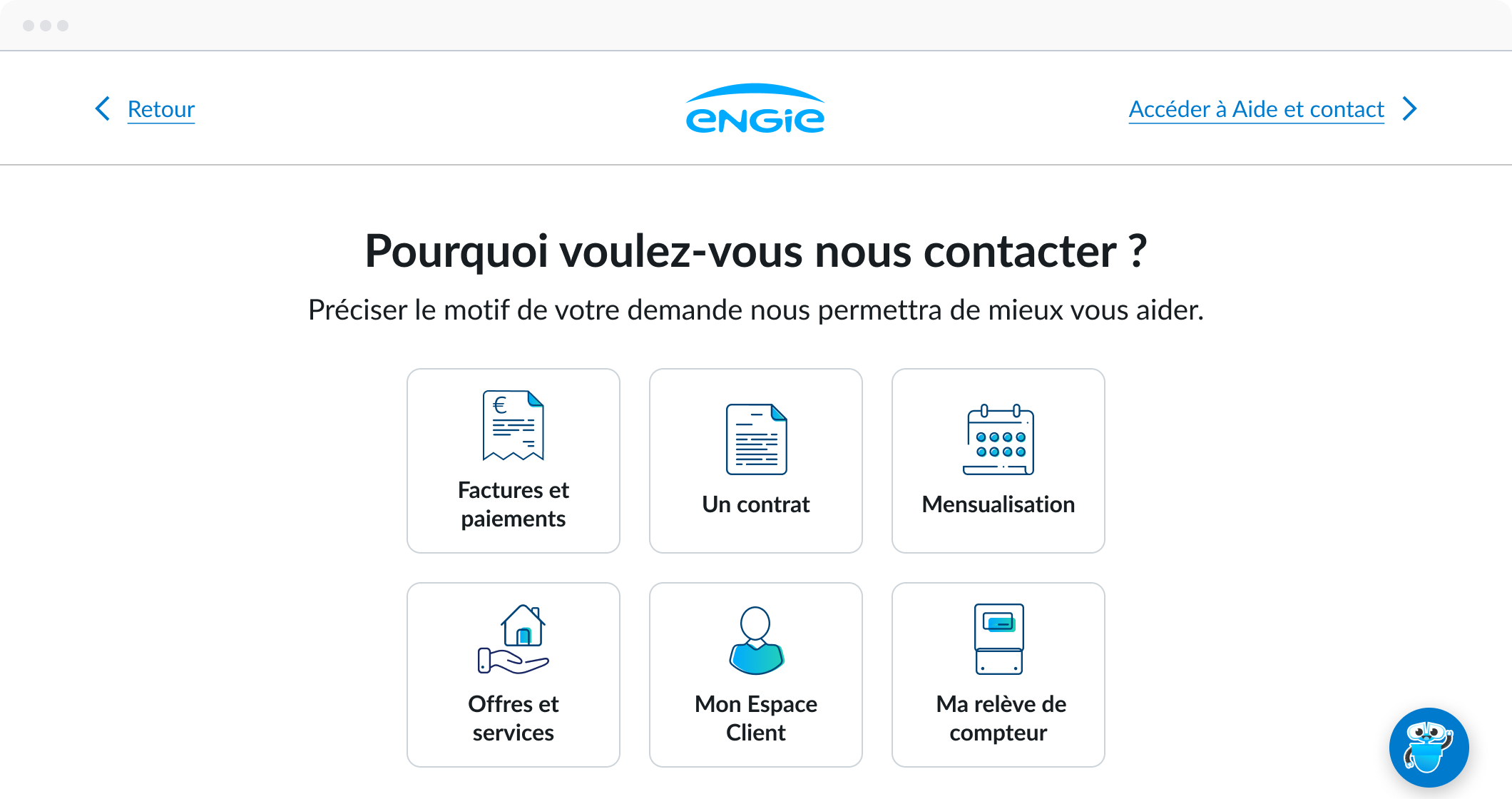
To replace dropdown menus, we designed cards to improve help topics glanceability while ensuring clarity and quick understand through microcopy and illustrative icons.
STEP 3 – SELFCARE
Leveraging self-care for common issues.
Fixing the frequently asked questions area
Self-care uses different practices like FAQ or action-driven component to help users solve common issues on their own. The FAQ area is first step and the best opportunity to catch user attention on common problem.
Before
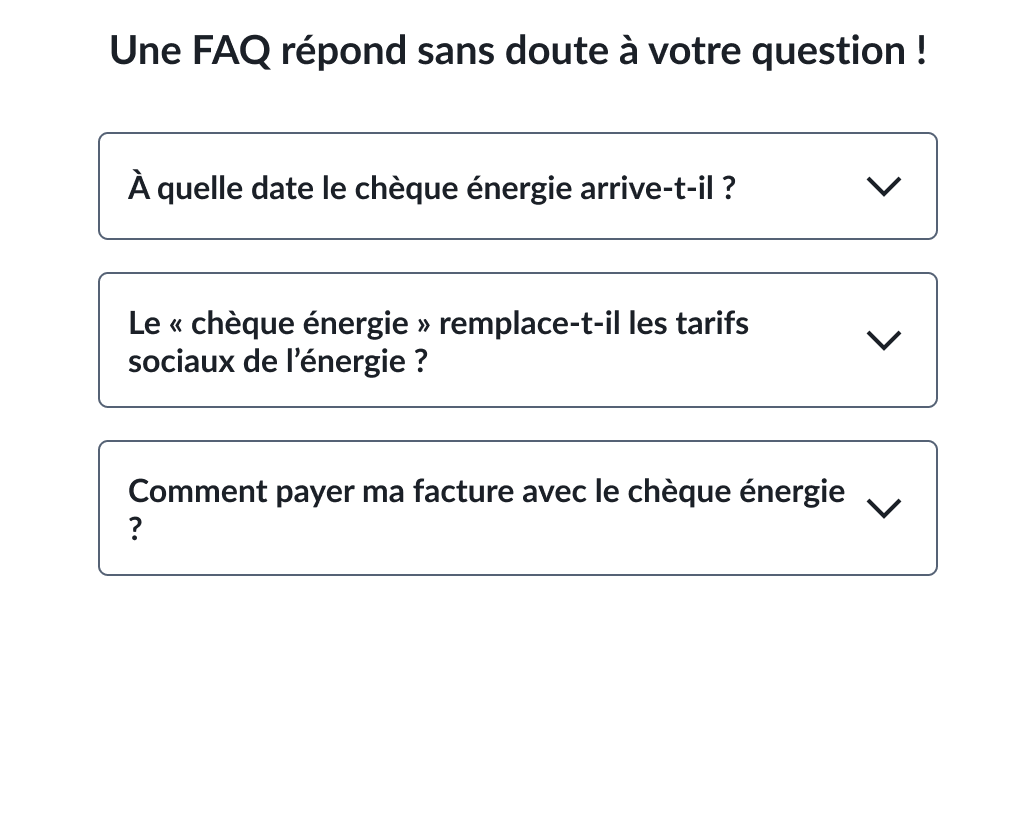

Affordance issue could lead to misunderstanding

FAQ collapsed by default raise interaction cost
After
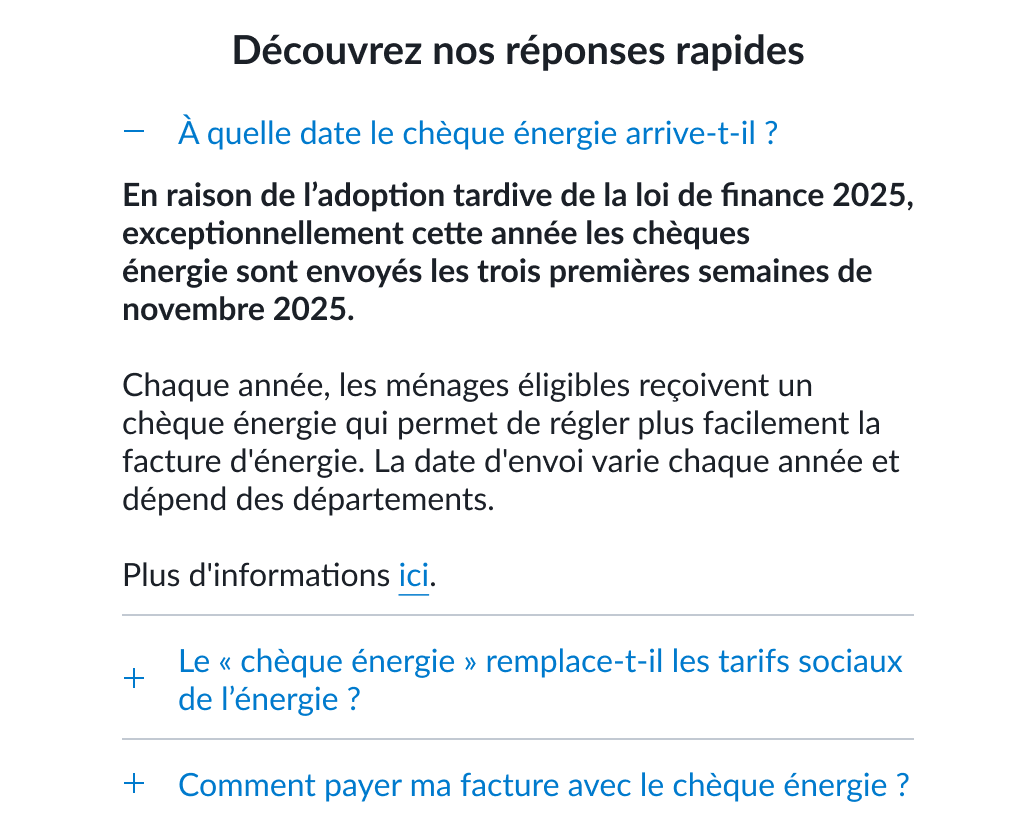
New component fixes misleading affordance

Microcopy clearly adresses the problem
First FAQ open by default reducing interaction cost
Driving towards action through action-oriented component
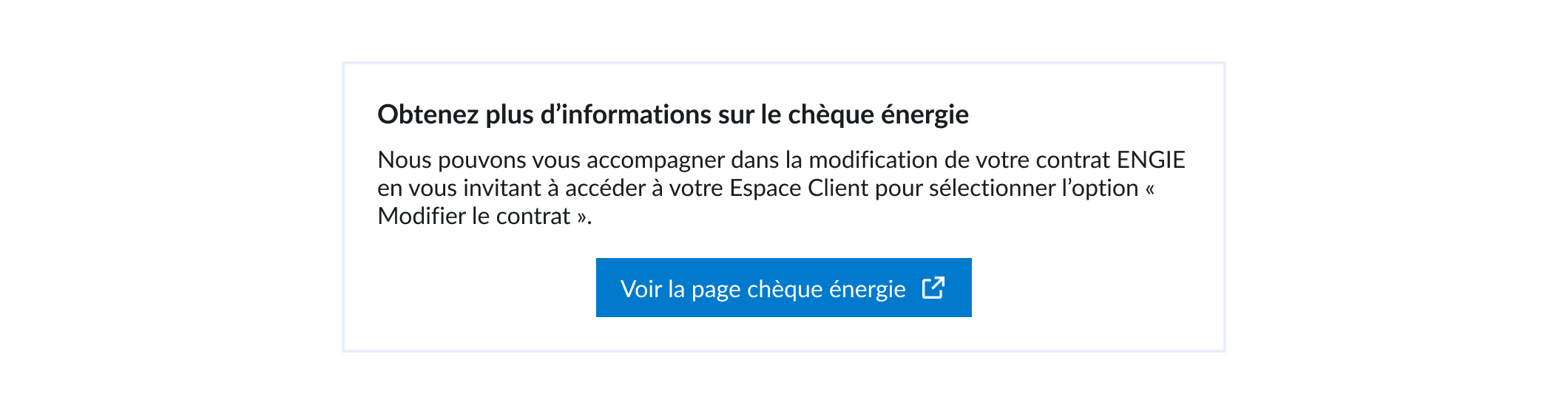
The self-care step also introduces an action-oriented component redirecting to customer interface allowing them to solve issue by their own for common issues.

CUSTOMER EXPERIENCE
Reduced logged-in customer effort.
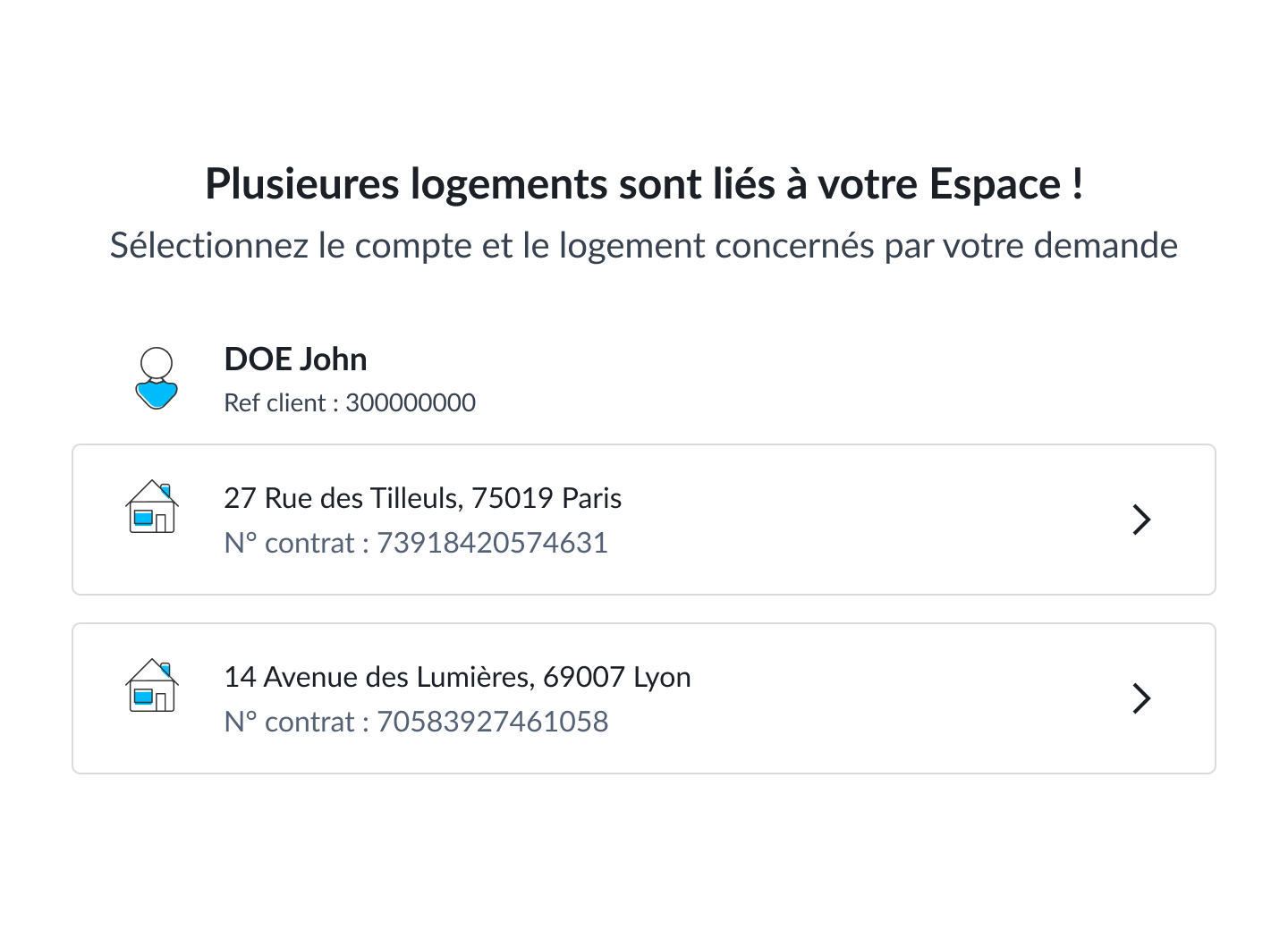
Multiple houses customer
In case the customer has multiple energy contracts, he is asked to pick the one concerned by the customer request.
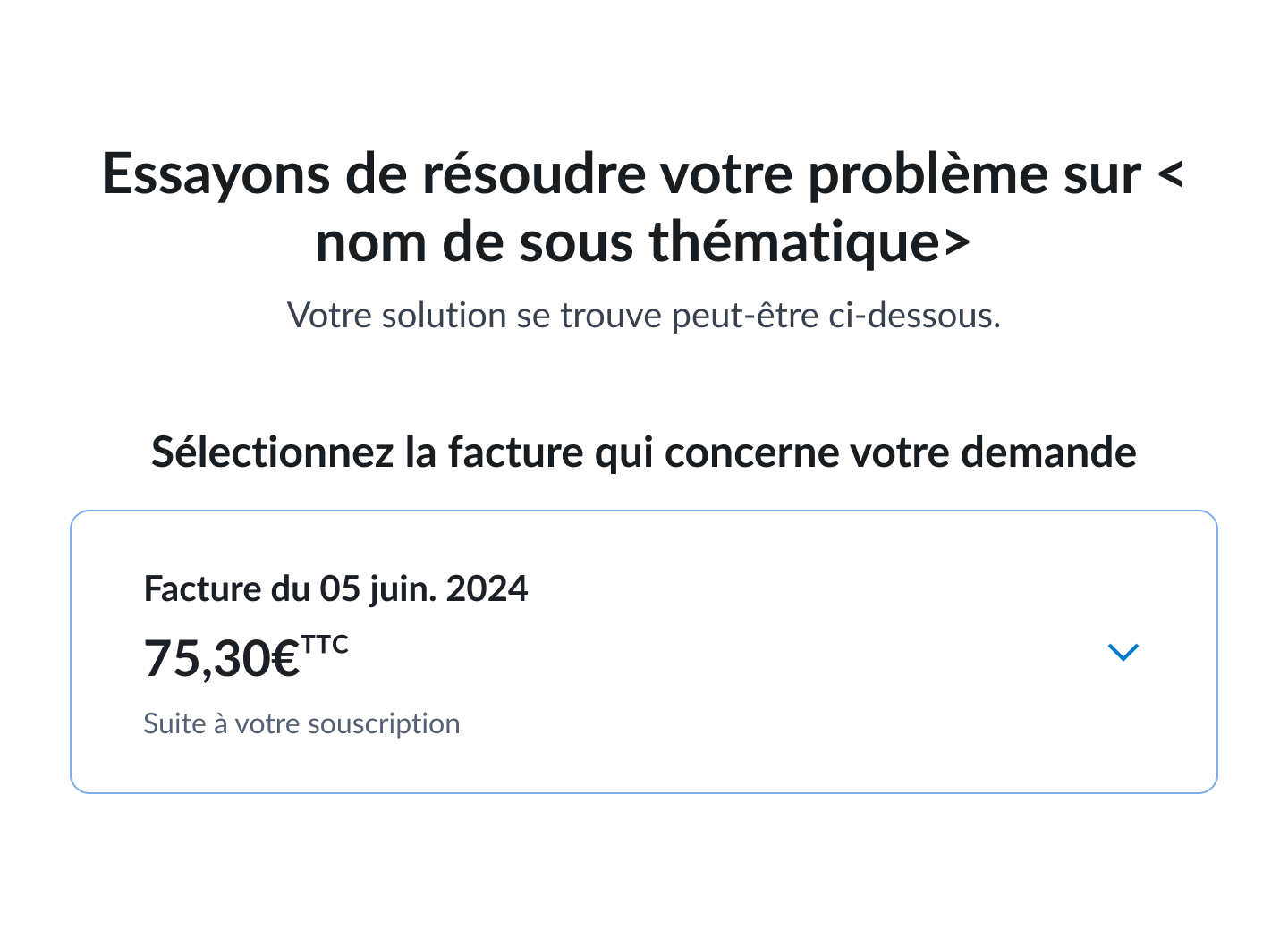
Choosing invoice
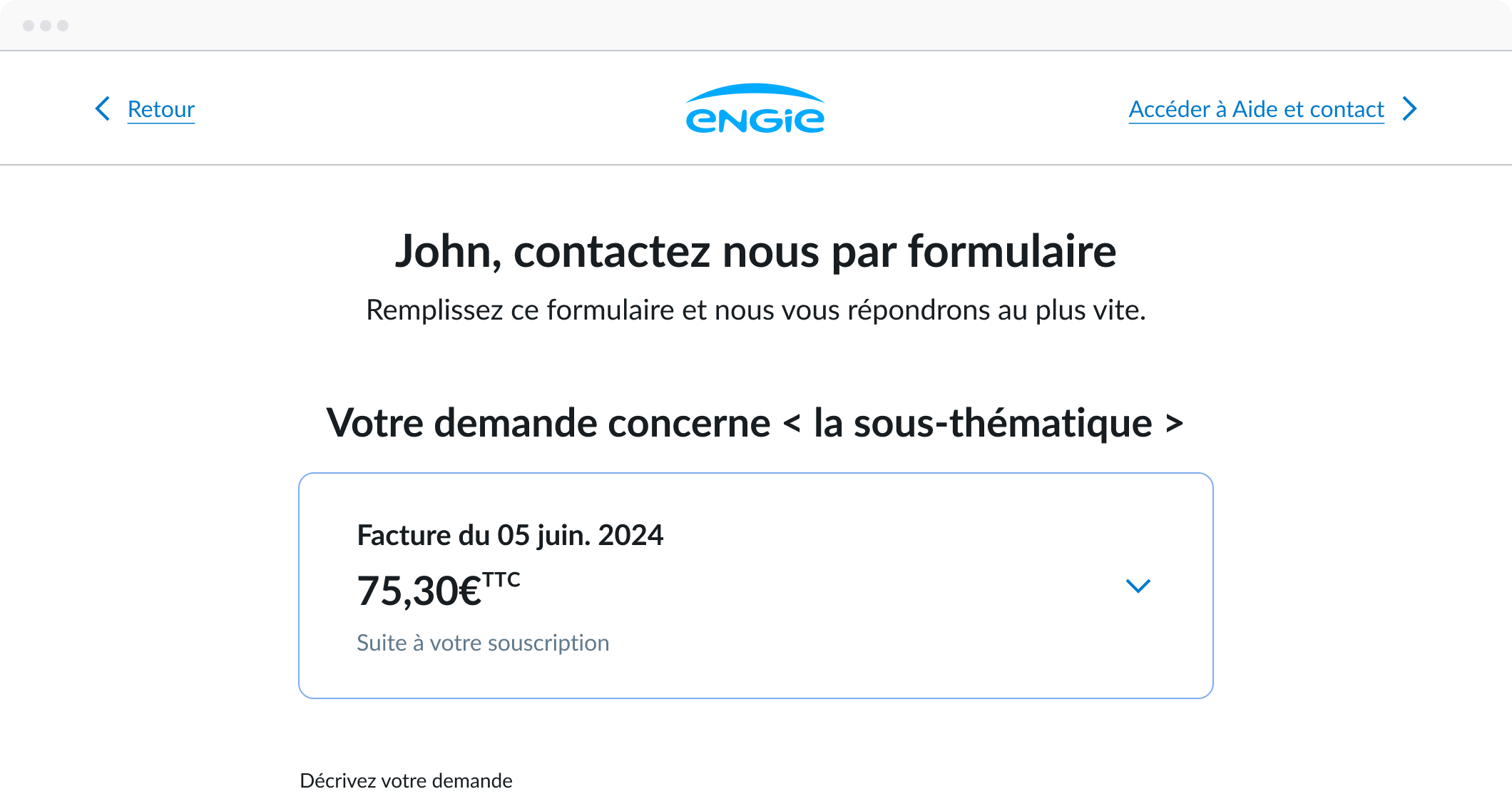
As several customer requests concerns billing and invoice, we created a way for customer to select specific invoice for the customer request on step 2.
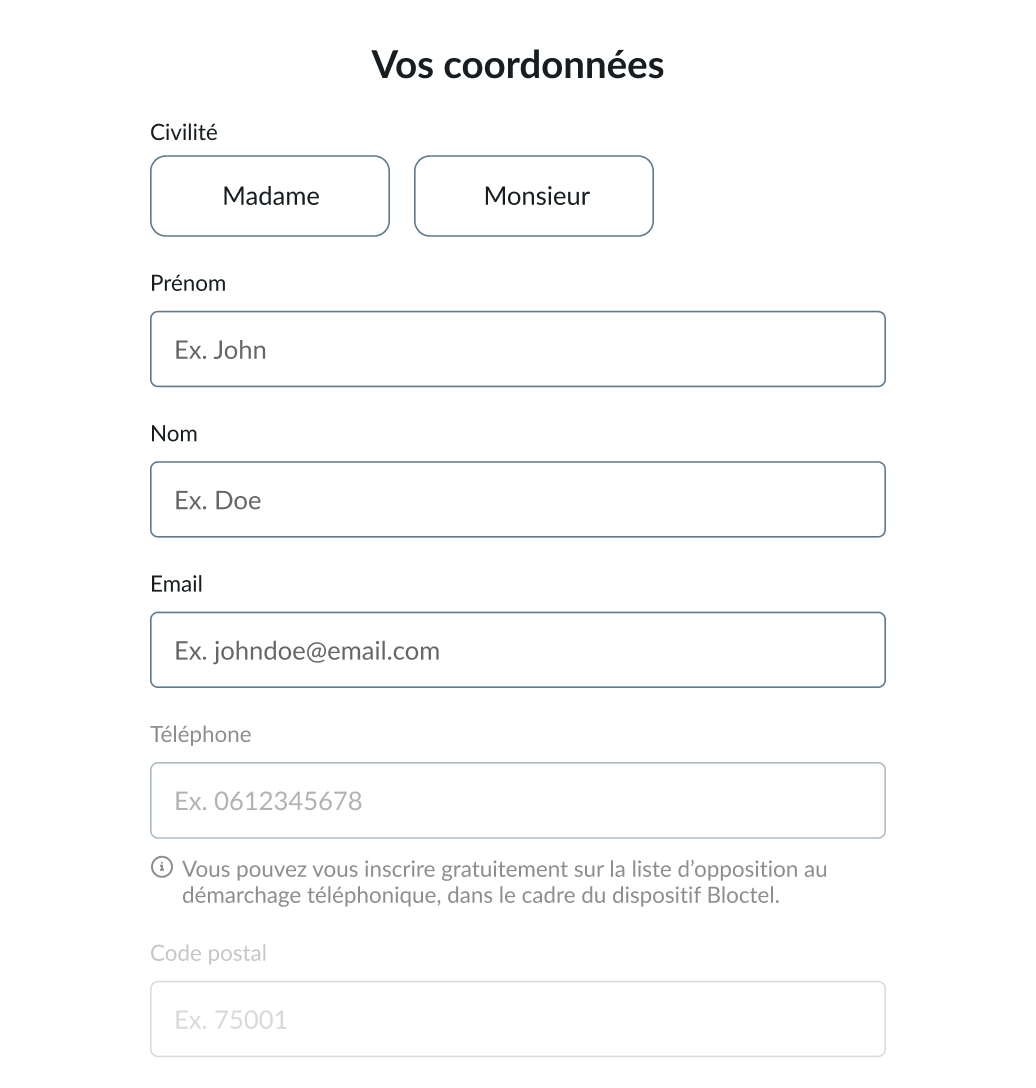
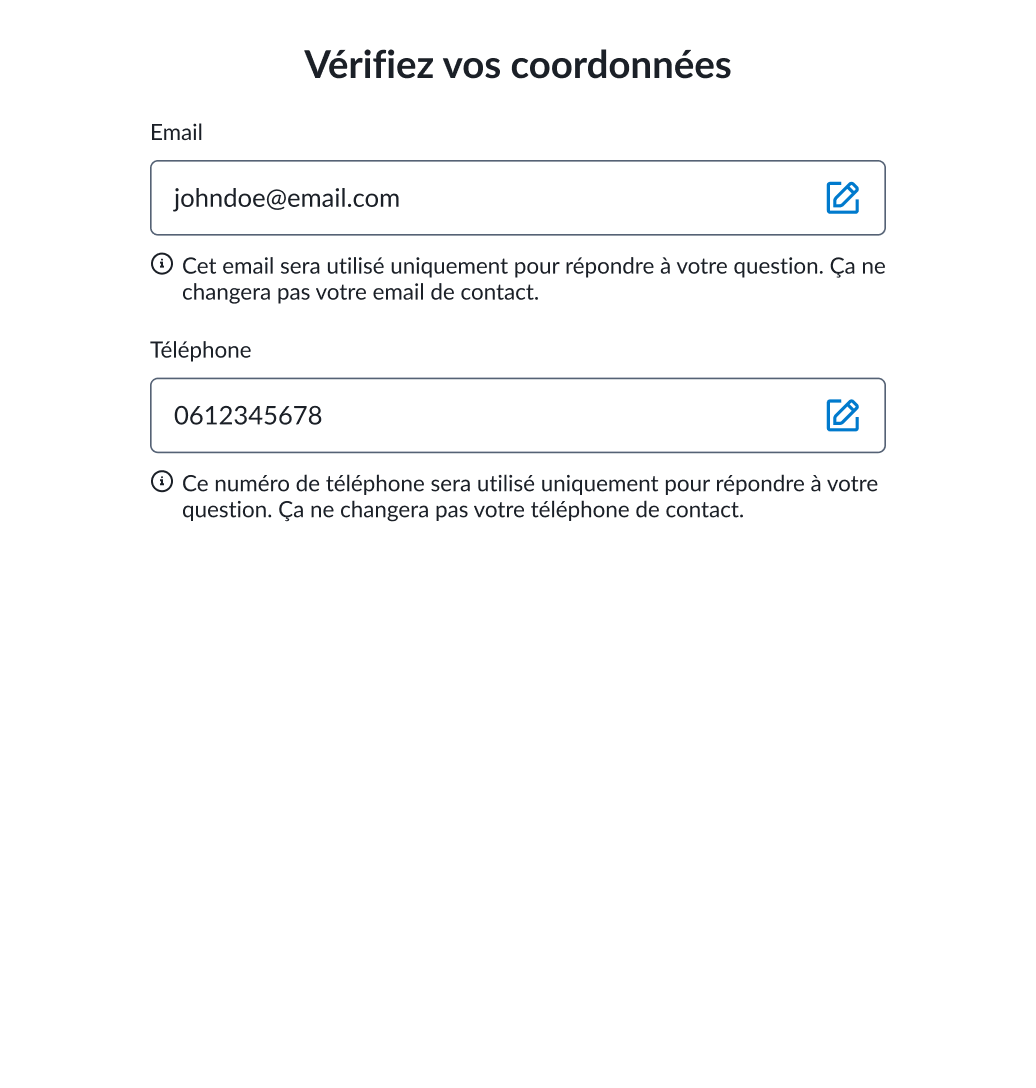
Reducing form filling effort for customers
Once user logged-in, he only needs to review and confirm pre-filled information from fetched data.
Before
After

RESULTS
What we shipped.

LEARNINGS
My learnings from this project.
Key learnings

Data-informed design
Relying on data helps uncover user behavior patterns and turn them into actionable insights and grounded design decisions.
Embrassing trade-offs
Team discussions and trade-offs are part of the design process. They are often essential to meet both, technical and business requirements.
Cross-functional collaboration
Collaborating with other roles showed me value of cross-functional input in shaping cohesive experiences.
Next project
UX/UI DESIGN
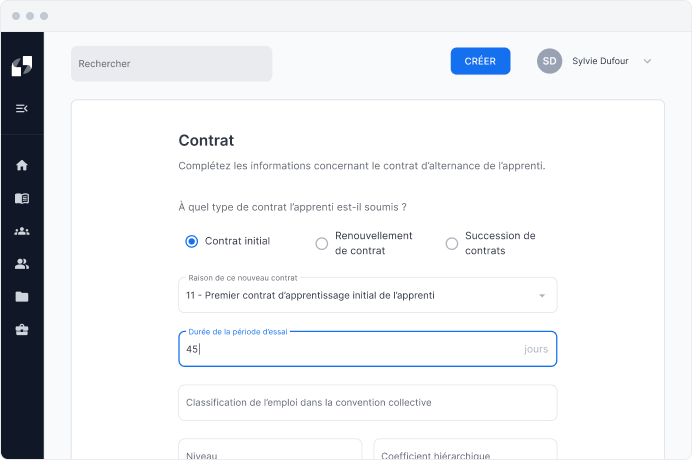
Simplifying contracts creation
Designed core product experience allowing training centers to reduce time for contract creation processes.
Read case study
Thank you for your interest!
Back to projects
Case study
Contact form redesign
Redesigning ENGIE’s contact form to improve customer assistance and reduce customer support overload.
Role & Tasks
UX Designer: UX Analytics, Heuristic Analysis, UX Design
Timeline & Status
3 months (2025)
Shipped
Team
1 Project Manager, 1 UX Designer, 1 UX Writer, 1 UI Designer, 2 Devs
Project summary
In 2025, ENGIE’s customer support team pinpointed a high reiteration rate of customer help requests generating costs and impacting customer satisfaction.
During my apprenticeship, I’ve worked with the Help & Support Team to identify pain points and co-create a new experience for the web contact form.
The contact form was shipped in mars 2025 and launched few months after my apprenticeship ends making difficult to see the impact on OKR.
PROBLEM SPACE
Customer support became highly expensive.
We noticed a high reiteration rate following customer requests
1 out of 5
help request are repeated with support.
1/3
customer not satisfied following help request.
Half of the customer requests relates to billing
Technical assistance
Other
Contracts (20%)
ENGIE’s engagement (7%)
Billing & invoicing (54%)
Intervention & troubleshooting
Offers & services (10%)
Consumption reading meter
As a result, we’re seeing...

An increase in customer dissatisfaction.

Higher processing costs per support request.
So what are we trying to solve?
Problem statement
OJBECTIVES
Key challenges & North Star Metrics
Streamline the user experience and improve clarity.
Reduce the rate of help requests reiteration.
Better route requests and optimize response times.
UX ANALYSIS
Making room for improvements.
Contact form relies on an excessively long page
The contact form was built as a single page that grows according to user choices, resulting in a very long scrolling experience.
Customer identifier became a barrier to accessing the form

Frequently ignored, this step requires user to look after invoices to get their customer identifier.

Prone to errors, the input field lacks any formatting or validation to prevent mistakes.
Help topics are behind dropdown menus
Dropdown menu makes support themes poorly glanceable while having poor usability.

Missing topics and imprecise labels can lead to confusion.
Generic and poorly personalized assistance
FAQ content lacks relevance to the selected theme.
Component looks like dropdown menu, leading to unclear affordances.
Legal disclaimer following cross-sell section
Cross-selling appears unexpectedly at the end of the form, potentially triggering user reactance.

Legal disclaimer is long requiring significant cognitive effort to read.
NEW USER FLOW
Starting from what was already built.
Shifting from single page to progressive steps
As the single-page layout generate high cognitive load combining multiple tasks and steps, we’ve broken down the page into successive steps using the progressive disclosure principle.
STEP 1 – CUSTOMER IDENTIFIER
Fixing the access to the form.
Customer identifier isn’t always required
As identifying the customer upfront is not necessary, we’ve introduced a login flow that encourages customers to sign-in while leveraging their customer data.
Designing a dedicated login step
To encourage users sign-in we’ve explored different uses cases to picture the user journey through rapid prototyping.
1. An information banner with a hyperlink
Non-blocking for users, who can choose whether or not to sign in.
Low engagement, and therefore likely to be ignored by users.
2. A modal dialog?
May be perceived as intrusive and trigger user reactance.
Technically challenging and expensive to build.
3. Or a dedicated login page?
Follows previous step and can be perceived as part of the user journey.
An existing page, requiring no additional development cost.
May be perceived as a constraining step.
Finding compromise between tech & user experience
Following team discussions, a dedicated login page was identified as a viable trade-off, limiting development cost while keeping sign-in optional for end users.
STEP 2 – HELP TOPICS
Improving legibility.
Making help topics more glanceable
To replace dropdown menus, we designed cards to improve help topics glanceability while ensuring clarity and quick understand through microcopy and illustrative icons.
STEP 3 – SELFCARE
Leveraging self-care for common issues.
Fixing the frequently asked questions area
Self-care uses different practices like FAQ or action-driven component to help users solve common issues on their own. The FAQ area is first step and the best opportunity to catch user attention on common problem.
Before
Affordance issue could lead to misunderstanding
FAQ collapsed by default raise interaction cost
After
New component fixes misleading affordance
Microcopy clearly adresses the problem
First FAQ open by default reducing interaction cost
Driving towards action through action-oriented component
The self-care step also introduces an action-oriented component redirecting to customer interface allowing them to solve issue by their own for common issues.
CUSTOMER EXPERIENCE
Reduced logged-in customer effort.
Multiple houses customer
In case the customer has multiple energy contracts, he is asked to pick the one concerned by the customer request.
Choosing invoice
As several customer requests concerns billing and invoice, we created a way for customer to select specific invoice for the customer request on step 2.
Reducing form filling effort for customers
Once user logged-in, he only needs to review and confirm pre-filled information from fetched data.
Before
After
RESULTS
What we shipped.
LEARNINGS
My learnings from this project.
Key learnings
Data-informed design
Relying on data helps uncover user behavior patterns and turn them into actionable insights and grounded design decisions.
Embrassing trade-offs
Team discussions and trade-offs are part of the design process. They are often essential to meet both, technical and business requirements.
Cross-functional collaboration
Collaborating with other roles showed me value of cross-functional input in shaping cohesive experiences.
Next project
UX/UI DESIGN
Simplifying contracts creation
Designed core product experience allowing training centers to reduce time for contract creation processes.
Read case study
Thank you for your interest!
Back to projects
Case study
Contact form redesign
Redesigning ENGIE’s contact form to improve customer assistance and reduce customer support overload.
Role & Tasks
UX Designer: UX Analytics, Heuristic Analysis, UX Design
Timeline & Status
3 months (2025)
Shipped
Team
1 Project Manager, 1 UX Designer, 1 UX Writer, 1 UI Designer, 2 Devs
Project summary
In 2025, ENGIE’s customer support team pinpointed a high reiteration rate of customer help requests generating costs and impacting customer satisfaction.
During my apprenticeship, I’ve worked with the Help & Support Team to identify pain points and co-create a new experience for the web contact form.
The contact form was shipped in mars 2025 and launched few months after my apprenticeship ends making difficult to see the impact on OKR.

PROBLEM SPACE
Customer support became highly expensive.
We noticed a high reiteration rate following customer requests
1 out of 5
help request are repeated with support.
1/3
customer not satisfied following help request.
Half of the customer requests relates to billing
Technical assistance
Other
Contracts (20%)
ENGIE’s engagement (7%)
Billing & invoicing (54%)
Intervention & troubleshooting
Offers & services (10%)
Consumption reading meter
As a result, we’re seeing...

An increase in customer dissatisfaction.

Higher processing costs per support request.
So what are we trying to solve?
Problem statement

OJBECTIVES
Key challenges & North Star Metrics

Streamline the user experience and improve clarity.

Reduce the rate of help requests reiteration.

Better route requests and optimize response times.
UX ANALYSIS
Making room for improvements.
Contact form relies on an excessively long page
The contact form was built as a single page that grows according to user choices, resulting in a very long scrolling experience.
Customer identifier became a barrier to accessing the form

Frequently ignored, this step requires user to look after invoices to get their customer identifier.

Prone to errors, the input field lacks any formatting or validation to prevent mistakes.
Help topics are behind dropdown menus

Dropdown menu makes support themes poorly glanceable while having poor usability.
Missing topics and imprecise labels can lead to confusion.
Generic and poorly personalized assistance

FAQ content lacks relevance to the selected theme.
Component looks like dropdown menu, leading to unclear affordances.
Legal disclaimer following cross-sell section
Cross-selling appears unexpectedly at the end of the form, potentially triggering user reactance.
Legal disclaimer is long requiring significant cognitive effort to read.

NEW USER FLOW
Starting from what was already built.
Shifting from single page to progressive steps
As the single-page layout generate high cognitive load combining multiple tasks and steps, we’ve broken down the page into successive steps using the progressive disclosure principle.

STEP 1 – CUSTOMER IDENTIFIER
Fixing the access to the form.
Customer identifier isn’t always required
As identifying the customer upfront is not necessary, we’ve introduced a login flow that encourages customers to sign-in while leveraging their customer data.
Designing a dedicated login step
To encourage users sign-in we’ve explored different uses cases to picture the user journey through rapid prototyping.
1. An information banner with a hyperlink

Non-blocking for users, who can choose whether or not to sign in.

Low engagement, and therefore likely to be ignored by users.
2. A modal dialog?
May be perceived as intrusive and trigger user reactance.
Technically challenging and expensive to build.
3. Or a dedicated login page?
Follows previous step and can be perceived as part of the user journey.
An existing page, requiring no additional development cost.
May be perceived as a constraining step.
Finding compromise between tech & user experience
Following team discussions, a dedicated login page was identified as a viable trade-off, limiting development cost while keeping sign-in optional for end users.
STEP 2 – HELP TOPICS
Improving legibility.
Making help topics more glanceable
To replace dropdown menus, we designed cards to improve help topics glanceability while ensuring clarity and quick understand through microcopy and illustrative icons.
STEP 3 – SELFCARE
Leveraging self-care for common issues.
Fixing the frequently asked questions area
Self-care uses different practices like FAQ or action-driven component to help users solve common issues on their own. The FAQ area is first step and the best opportunity to catch user attention on common problem.
Before
Affordance issue could lead to misunderstanding

FAQ collapsed by default raise interaction cost
After
New component fixes misleading affordance
Microcopy clearly adresses the problem
First FAQ open by default reducing interaction cost
Driving towards action through action-oriented component
The self-care step also introduces an action-oriented component redirecting to customer interface allowing them to solve issue by their own for common issues.

CUSTOMER EXPERIENCE
Reduced logged-in customer effort.
Multiple houses customer
In case the customer has multiple energy contracts, he is asked to pick the one concerned by the customer request.
Choosing invoice
As several customer requests concerns billing and invoice, we created a way for customer to select specific invoice for the customer request on step 2.
Reducing form filling effort for customers
Once user logged-in, he only needs to review and confirm pre-filled information from fetched data.
Before
After

RESULTS
What we shipped.
LEARNINGS
My learnings from this project.
Key learnings

Data-informed design
Relying on data helps uncover user behavior patterns and turn them into actionable insights and grounded design decisions.
Embrassing trade-offs
Team discussions and trade-offs are part of the design process. They are often essential to meet both, technical and business requirements.
Cross-functional collaboration
Collaborating with other roles showed me value of cross-functional input in shaping cohesive experiences.
Next project
UX/UI DESIGN
Simplifying contracts creation
Designed core product experience allowing training centers to reduce time for contract creation processes.
Read case study
Thank you for your interest!
Back to projects